


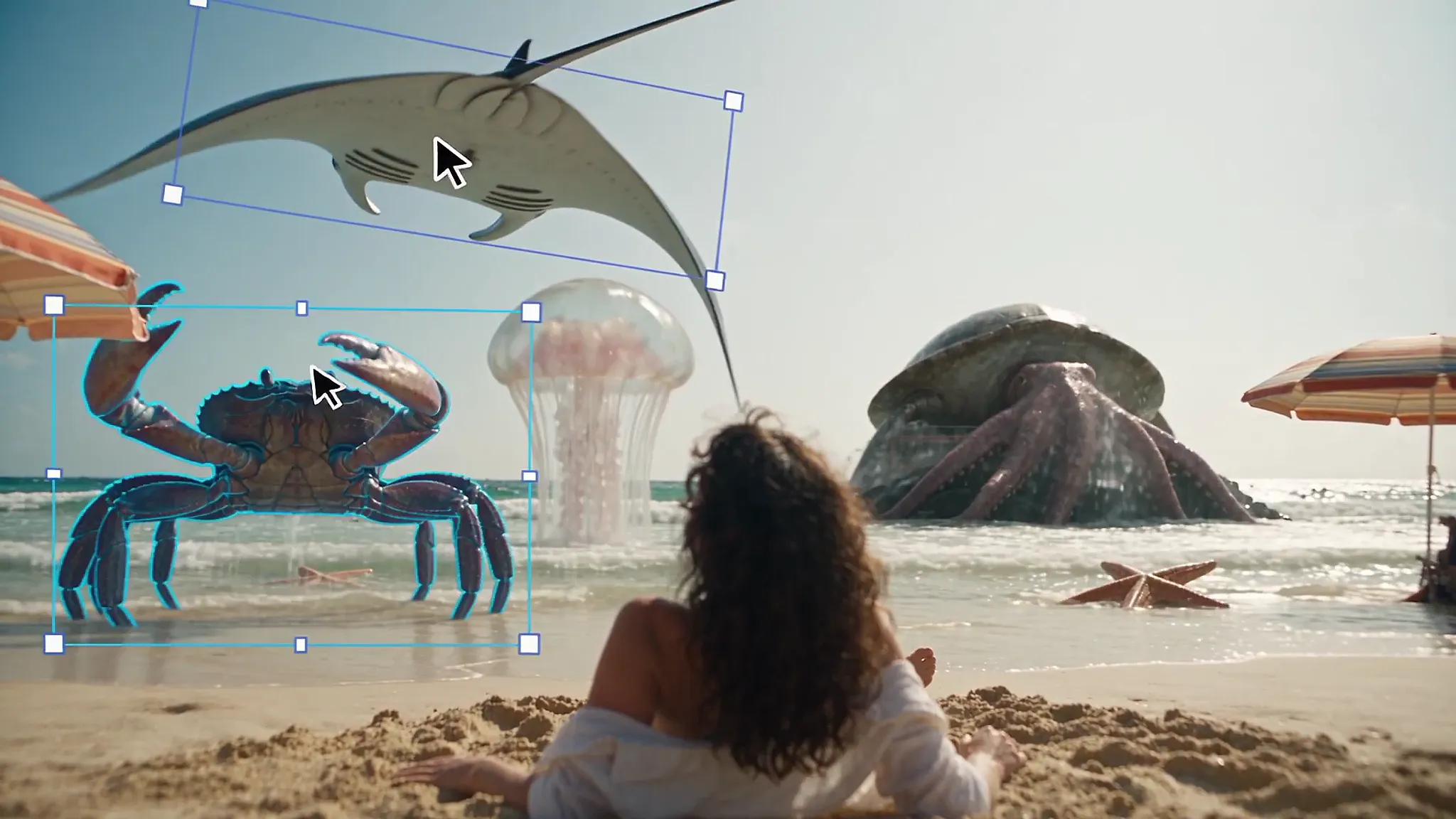
Image: @runwayml (X) (video still)
Summary
- Runway unveiled Layers on X on September 25, a feature that splits a single image into editable layers, powered by ByteDance's Seedream 5.0 Layers model.
- Upload an image in Tool mode and it is separated into transparent PNG layers even without a prompt; only the split costs 18 credits, while editing and downloading are free.
- According to Runway's changelog, the tool first arrived on paid plans on August 19, and exported layers are raster PNGs rather than PSD files, so any text has to be retyped.
Runway posted a new feature called Layers to its official X account on September 25. It splits a single image into multiple editable layers. In the post, Runway said it can "split any image into editable layers with a single click," adding that users can "remove backgrounds, edit text and rework any element on its own, all without leaving Runway." The engine behind the feature is not a Runway model. It is ByteDance's image model, Seedream 5.0 Layers. Each split costs 18 credits, and editing and downloading after that cost nothing.
Getting started takes only a few steps. According to Runway's Help Center guide, you open Tool mode from the left menu, pick the Image tab, and search the model list for Seedream 5.0 Layers. Once an image is uploaded, you can hit generate right away with no prompt at all. The model recognizes what is in the picture on its own and separates it into PNG layers with transparent backgrounds. You only need to type a description when you want a small element pulled out on its own.
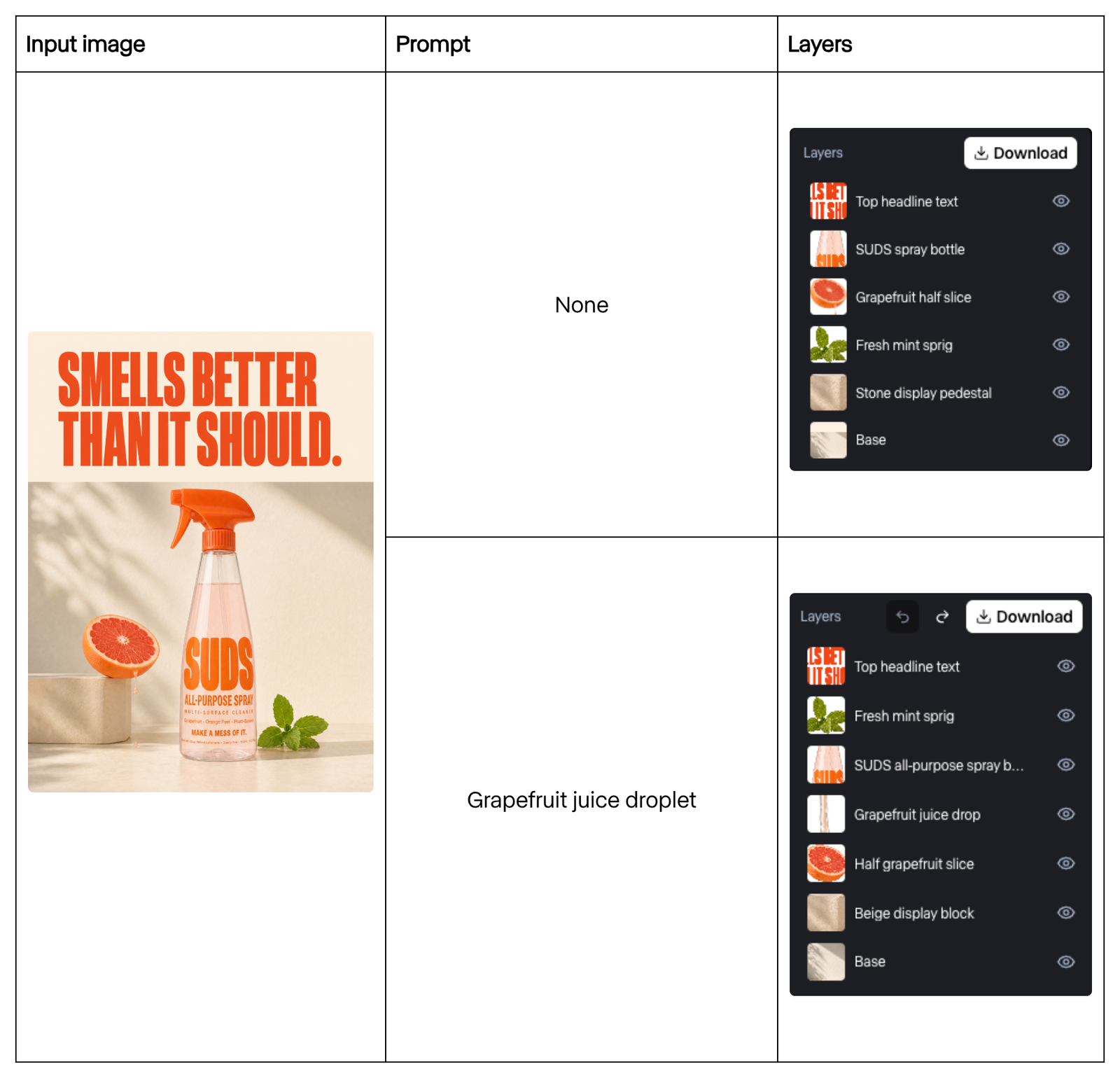
An example in the Help Center shows the difference. An ad image with an orange headline above a spray cleaner bottle, half a grapefruit, a mint sprig and a stone pedestal came back as six layers with no prompt: the top headline text, the spray bottle, the grapefruit half, the mint sprig, the stone pedestal and the base. When the same image was run with the prompt "Grapefruit juice droplet," a single drop of juice falling from the grapefruit came out as a seventh, separate layer.
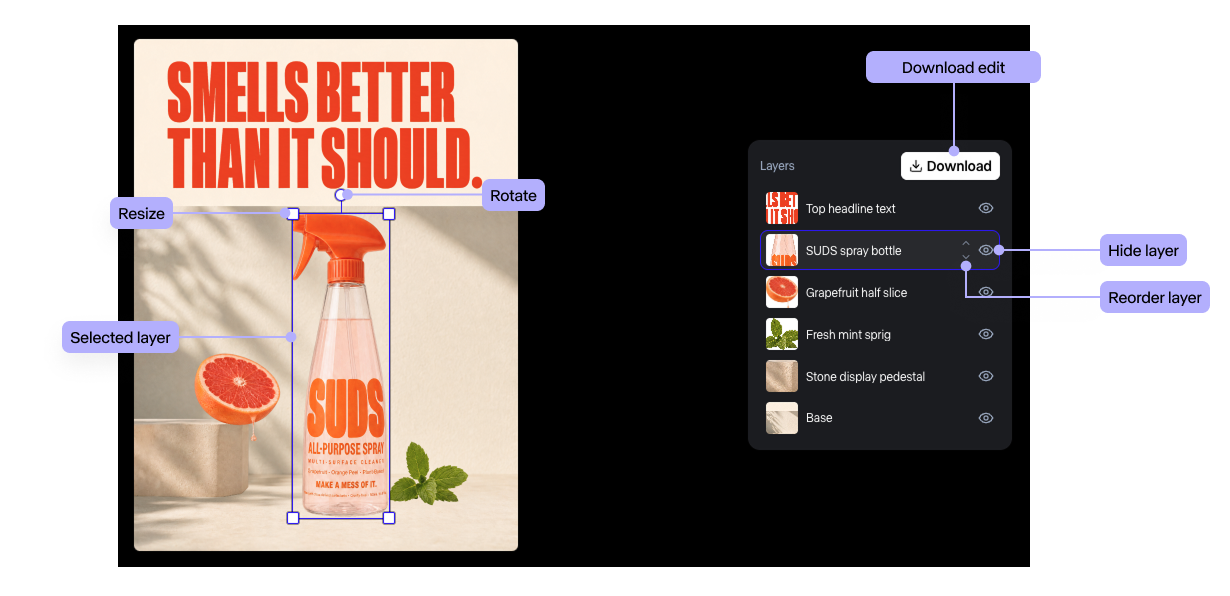
Once the layers are ready, a layer editor opens on the same screen. It covers layer management, including selecting, hiding and reordering, and editing, including moving, resizing and rotating. You can download the finished result as a single image, or export the layers one by one and bring them into another editing program. Runway explained that the only step that uses credits is the separation itself, triggered by the Generate button, so edited versions can be downloaded as many times as you like at no extra cost.
The 45-second launch video, which METAL reviewed, opens like a B-movie monster flick. A crab bigger than a person, a manta ray and a jellyfish appear on a beach, and a mouse cursor grabs the creatures one by one with selection boxes and drags them up into the sky. Then the real product screen appears. Typing "seed" into the model search brings up Seedream 5.0 Pro, a fake movie poster called CLAWS is uploaded, Generate is clicked, and the cursor picks up the crab and the beach ball in the poster and moves them separately. As of September 28, the post had drawn about 82,000 views, 672 likes and 308 bookmarks.
Runway's changelog shows that September 25 was not the day the tool first arrived. Runway added Seedream 5.0 Pro Layers to its paid plans on August 19, describing it as "a new tool that lets you toggle and transform each layer independently" and "ideal for fine-grained image editing and asset extraction." The September 25 post gave the tool a short new name, Layers, and put it front and center. In the same month, Runway also widened its path into existing editing software, releasing plugins for Adobe Premiere Pro and After Effects on September 8 and a DaVinci Resolve plugin on September 23.
The technology traces back to Seedream 5.0 Pro, which ByteDance's Seed team released on July 8. In its announcement, the Seed team named interactive precision editing as one of the model's four core capabilities, listing layer separation alongside point selection, lasso selection, color and material replacement, and multi-image fusion. In an example the Seed team shared, the model split one poster into more than 10 independent layers, including the text, the main subject (a parrot), the background and surrounding decorations. The Seed team explained that "the background areas previously obscured by the main subject are also seamlessly inpainted and restored," and it also showed the parrot being swapped out for a peacock.
That restoration, which paints in the background that was hidden, is the heart of the feature. Removing an object exposes an empty area that never existed in the original photo, and the model has to generate that area for the background to stand on its own as a separate layer. According to reports, the exported layers are still pixel images, so even when text lands on its own layer, its font and wording cannot be edited directly; it has to be deleted and rewritten. The files also come out as a bundle of transparent PNGs rather than Photoshop's native PSD format, and if overlapping objects get merged into one layer, you have to rerun the split with a different prompt, which costs another 18 credits each time. The Seed team itself wrote at the end of its announcement that there is still room to refine finer-grained text rendering and the consistency of pixel-level editing.
Splitting images into layers is not a new category in itself. METAL previously reported that Higgsfield released a tool in August that automatically breaks posters into layers, and according to reports, standalone services such as IntoLayers, Playyy and PixMind also offer image-to-layer conversion. What sets Runway apart is where the feature sits. Extracted assets move straight to the agent and video-generation tools in the same workspace. The Help Center advises that if an image looks flat or seems to be missing shadows after editing, you can ask the agent to add natural shadows. METAL has also covered Runway opening a connection that lets ChatGPT call Runway tools.
From a content marketer's desk, Layers is aimed at ad assets whose source files are gone. Reworking a campaign image for a new product or a different aspect ratio, when all that is left is the final JPG an agency handed over, used to mean cutting out the background and filling in hidden areas by hand. It is a bit like slicing an already baked cake back into its layers to pull out the sponge and the cream separately. Layers reduces that job to a single 18-credit click and sends the extracted product shot straight into video generation. Splitting an image into layers does not grant the right to rework someone else's image, but with this launch, the cost of turning a company's own finished assets back into raw material has dropped to a few credits.
Sources
- Runway (X) — New in Runway, Layers. Split any image into editable layers with a single click. →
- Runway Help Center — Editing images with Seedream 5.0 Layers →
- Runway — Product Updates & Changelog →
- ByteDance Seed — Beyond Generation, It Understands Design | Introducing Seedream 5.0 Pro →
- AlphaSignal — Runway Adds Seedream 5.0 Layers to Split Flat Images Into Editable Parts →


Comments