


Summary
- OpenAI's official developer account posted a 154-second demo video on X on October 12 (US time) unveiling the annotation expansion, which lets developers build custom annotation controls and suggested prompts.
- Presenter Katia Gil Guzman showed item-swap and color-picker controls in an interior design app and a suggested prompt in an expense app, saying a user's agent knows the user far better than a site does.
- According to OpenAI's documentation, site tools run on GPT-5.6 Sol or GPT-6 Sol, do not support the declarative API or tools inside iframes, and every call goes through a safety review before it runs.
OpenAI has broadened the annotation feature in the built-in browser of the ChatGPT desktop app, letting website developers attach custom controls and suggested prompts to annotations. OpenAI's official developer account posted a 154-second demo video on X on October 12 (US time), saying "annotations paired with WebMCP give your agents more context to act on." The annotation expansion is designed to work alongside WebMCP tools, through which a website hands actions directly to an agent. The post had 67,100 views at the time of collection.
The demo was led by Katia Gil Guzman, who helps developers build at OpenAI. She said WebMCP tool support had recently been added to the ChatGPT app and described WebMCP tools as actions a website exposes to agents, such as searching a catalog or updating something on the page. Annotations are an existing feature for pointing at a specific part of a page and asking ChatGPT to change it. Two things are new. Developers can build custom controls for annotations, and they can trigger annotations from code with suggested prompts that show users what they can do on the page.
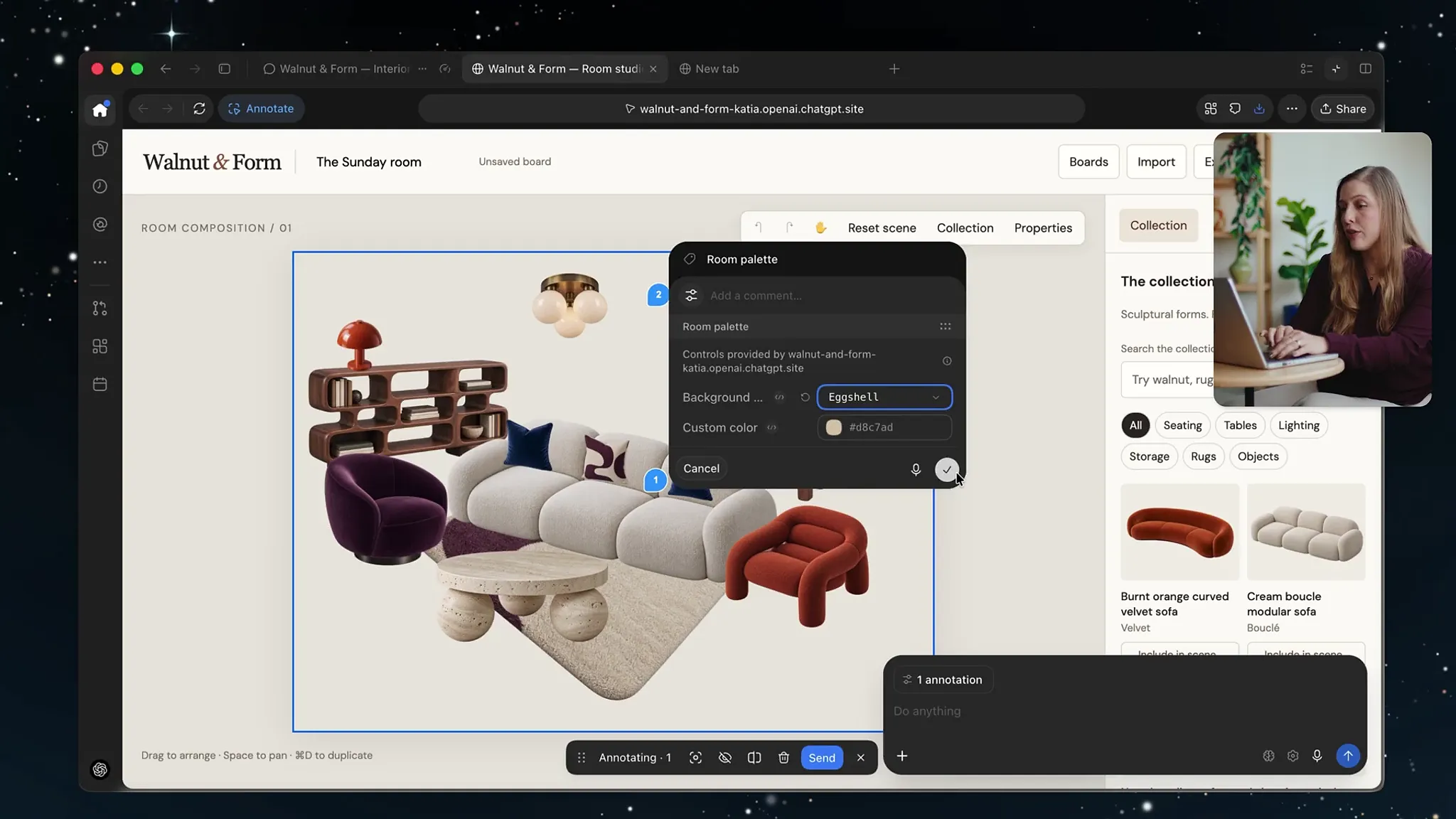
The first demo is an app for composing a room scene from a furniture catalog. In annotation mode, clicking an item in the scene brings up a control for swapping it with similar items, and clicking elsewhere opens a color picker. Users no longer need to browse the catalog or drag items themselves. According to Gil Guzman, these controls are all defined in the site's code as HTML attributes or JavaScript, and they give ChatGPT extra context about what the user clicked and what they want.
The second demo is an expense app. Clicking an expense brings up a suggested prompt asking ChatGPT to find context on that expense that the site does not have, and the agent then attaches the right metadata through a WebMCP tool provided by the site. "The real power of WebMCP is that a user's agent knows its specific context," Gil Guzman said. "The user's agent has context on their preferences, can access their data through plugins, and knows the user much better than your site ever will," she added.
According to OpenAI's documentation reviewed by METAL, site tools are ChatGPT's implementation of the proposed WebMCP standard. When a website offers its capabilities as a set of predefined tools, ChatGPT Work and Codex can discover and use them in the built-in browser of the ChatGPT desktop app. Unlike MCP, which connects to a local or remote server, it requires no separate MCP server installation or connection setup, and the user and the agent share the same live page and signed-in session. The documentation says the approach is useful when both need to see the same thing, such as editing a canvas or exploring a dashboard.
The conditions for use are narrow. The documentation recommends GPT-5.6 Sol or GPT-6 Sol for site tools, and WebMCP is disabled on GPT-5.6 Luna. In Enterprise workspaces an admin must allow the feature through policy, and it is not available in Edu workspaces. Selecting the site tools indicator in the address bar shows the tools a page provides, and recent activity lets users review past calls. OpenAI's own documentation site offers five tools: searching the docs, reading a page, reading the current route and selected text, navigating to a page, and generating a custom guide.
For engineers, the key point is the boundary between annotations and tools. The demo said annotation controls can be defined with HTML attributes, but the documentation states that the declarative API, which defines tools through HTML form attributes, is not supported as site tools. Tools registered inside iframes are also not discovered, whether same-origin or cross-origin. Tools must be registered in the top-level page's JavaScript with document.modelContext.registerTool, passing a name, description, input schema and execute function. The documentation's example is a page-title reader marked as read-only. It advises keeping inputs narrow, describing side effects, returning enough information to verify the result, and reusing existing authentication and authorization checks.
The documentation also lays out security measures. Tool definitions and results provided by websites are treated as untrusted content, and a tool's name or a claim that it only reads data is not proof of what it does. The built-in browser runs a safety review before each tool invocation, and existing confirmation policies still apply to consequential actions such as sending messages, making purchases, deleting data or changing permissions. "These checks reduce risk; they don't make a website or its output trustworthy," OpenAI wrote in the documentation. Users can turn site tools off in the browser permissions menu in settings.
METAL has previously reported that OpenAI is holding a WebMCP challenge with $35,000 in prizes. According to reports, OpenAI wrote in that challenge announcement: "Instead of leaving agents to guess their way through your UI, you define exactly how they can use your app." The WebMCP specification is a draft from the W3C Web Machine Learning Community Group and is not on the W3C Standards Track. In Chrome, developers can test it by enabling an experimental flag or joining an origin trial.
With this annotation expansion, what websites hand to agents has grown from a list of tools to signposts on the screen itself. Gil Guzman stressed that as more people use agents, apps should be built to work well with them. In a structure where a site defines what can be done and an agent carries it out on the user's behalf, the question left for developers is which actions to open up and where to require the user's confirmation.




Comments