


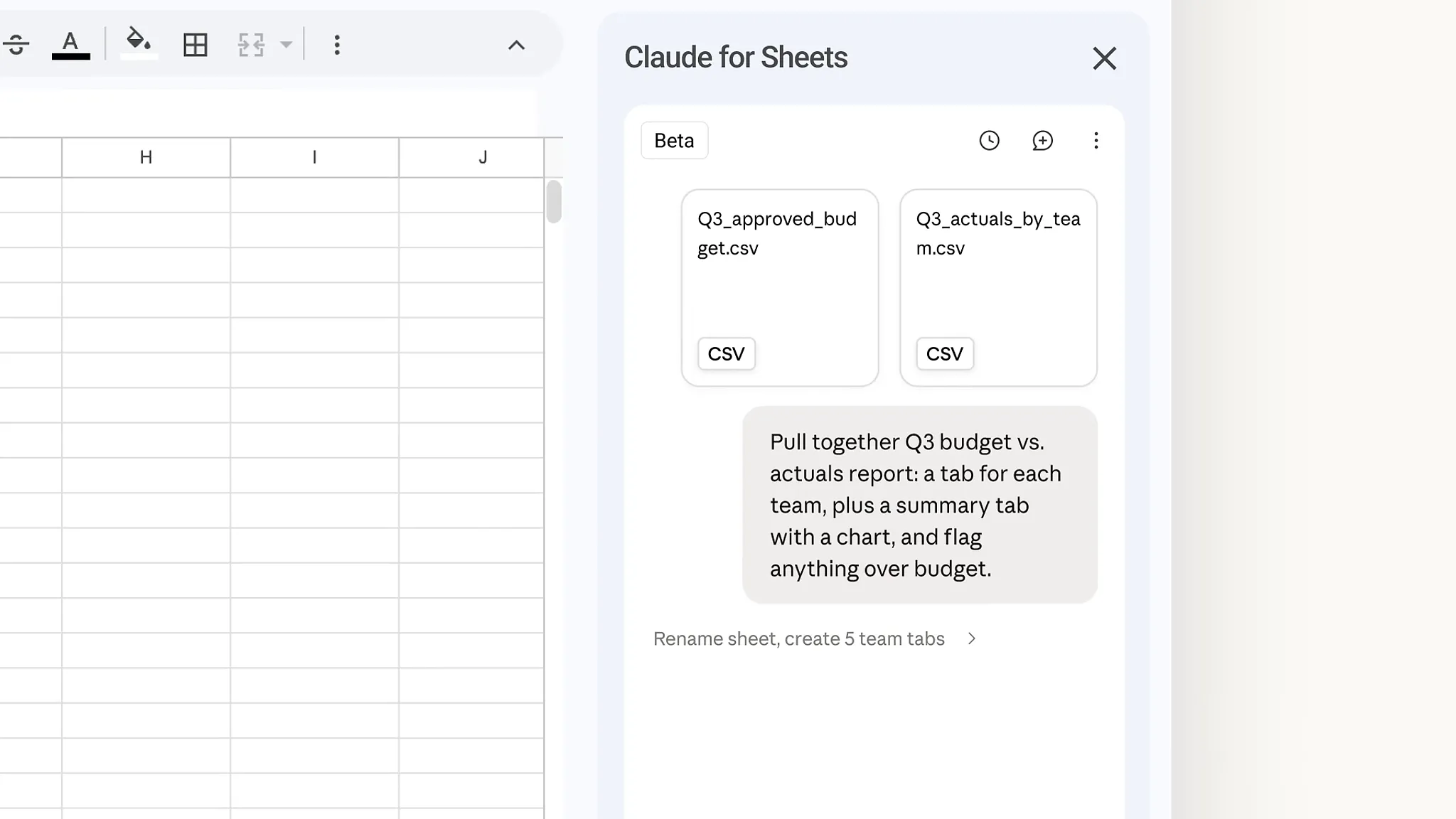
Image: @claudeai (X) (video still)
Summary
- On October 6, Anthropic released Claude for Google Workspace as a public beta on all paid Claude plans.
- Claude reads and edits the open file from a sidebar next to Docs, Sheets, and Slides, and in the default mode asks for user approval before each edit.
- It requests only two Google permissions, and third-party inference and zero data retention deployments are not supported in this beta.
AI company Anthropic has brought its AI model Claude inside Google Docs, Sheets, and Slides. Claude for Google Workspace, released on October 6, is an add-on available in public beta on all paid Claude plans. From a sidebar next to the open file, Claude reads the document, sees the text, cells, or slides the user has selected, and edits the file in place. A path in the opposite direction opened at the same time. Anthropic released new Google Docs, Sheets, and Slides connectors (beta) that let Claude create and edit Google files from the Claude chat.
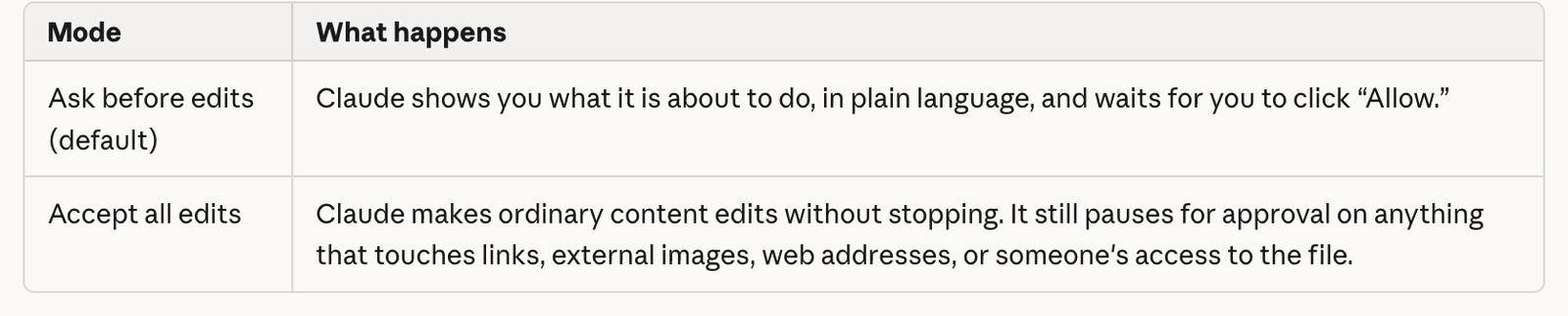
The core of the launch is who holds the power to edit. In the default "Ask before edits" mode, each change appears as an approval card with a summary, and Claude waits until the user allows it. Switching to "Accept all edits" mode lets Claude work through the task without stopping. "You decide how much Claude does on its own," Anthropic said in its announcement. Even in that mode, anything that touches links, external images, web addresses, or access to the file still requires approval.
In Google Docs, Claude can fix a single sentence or restyle a heading without touching the surrounding formatting. Larger rewrites appear as suggestion cards in the sidebar, each highlighting the passage it would change so the user can apply or dismiss it. Anthropic's example is tightening the executive summary of a product requirements document and turning the next steps into a table, both handled in one request.
In Sheets, Claude writes formulas, builds pivot tables and native Sheets charts, and adds new tabs. For joining tables or cleaning data, it pulls a range into Python and writes the results back into the sheet. The company said that if a user attaches source files to an empty sheet and asks for a Q3 budget vs. actuals report with a tab for each team and a summary chart, Claude can flag anything over budget. In Slides, Claude builds new slides from the deck's layouts and themes, then checks its own work and flags elements that overlap or run off the slide, or text that is hard to read.
The sidebar carries over the models, connectors, and skills the user already has in Claude. Asked for a quarterly business review (QBR) deck for a customer, Claude can pull account history from Salesforce and recent call notes through the Google Drive connector. If the QBR format is saved as a skill, the team can build the next deck with the same format and steps. On Enterprise plans, the Compliance API, customer-managed encryption keys (CMEK), and OpenTelemetry audit export also apply to the add-on.
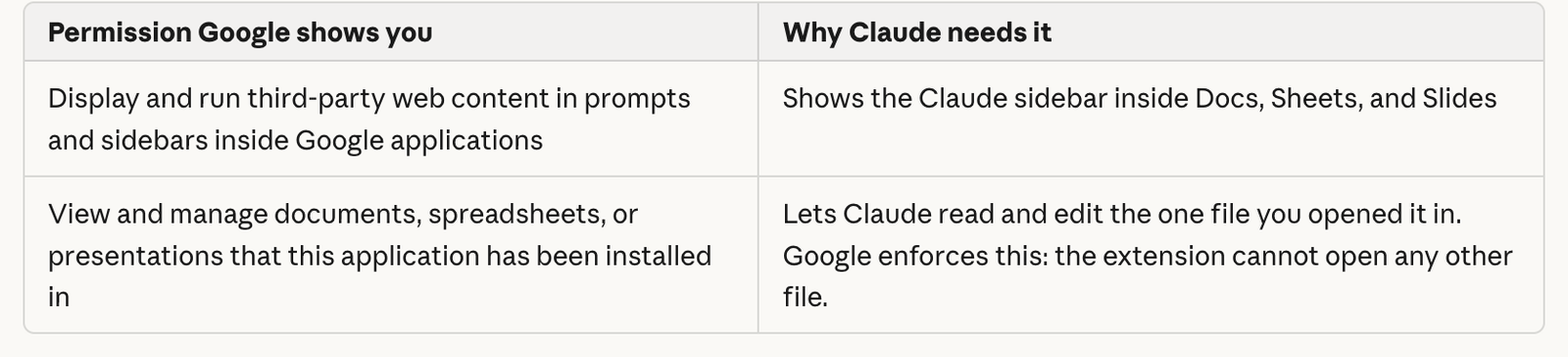
According to Anthropic's help center article, which METAL reviewed, Claude requests only two permissions from Google. One displays the sidebar inside the document, and the other lets it view and manage the documents the add-on has been installed in. It does not request access to Drive, Gmail, Calendar, or contacts, or the ability to make network requests from the file. "Google enforces this: the extension cannot open any other file," the help center article explains. Claude's edits are recorded in version history under the user's name, and it refuses to share the file, grant access, change ownership, or create menus and scheduled automations even when asked.
Hidden instructions inside documents are also addressed. Files made by others can contain instructions written in white text or tiny fonts. Anthropic said Claude treats document content as data rather than commands, labels hidden text it finds, and is designed not to follow instructions in a document to share the file, fetch a link, or contact anyone. It still advised users to review Claude's proposed actions before approving them, especially in files received from outside their organization. File contents and messages are not used for model training, and inputs and outputs are deleted from Anthropic's systems within 30 days. Chat history is stored per file, only in the user's browser.
Enterprise deployment terms differ from Claude for Microsoft 365. Third-party inference through Amazon Bedrock, Google Cloud Vertex AI, or Azure AI Foundry is not supported in this beta, and only Claude account sign-in is accepted. As a result there is no zero data retention (ZDR) deployment path, and HIPAA-ready organizations are told not to use it with protected health information. A single operation can run for up to six minutes under Google's limits, Firefox is not supported, and Claude cannot read or act on comments in Google Docs. Charts placed in Slides are inserted as images that are not linked to Sheets.
In the competitive picture, Claude is the one catching up. According to reports, Google's Gemini has sat in Workspace side panels since June 2024, and ChatGPT began showing Drive files beside its chat and letting users update them on August 13. ChatGPT's edits happen inside ChatGPT rather than in Google's own apps. Claude now offers both an in-file sidebar and chat-based editing. METAL has previously reported that Google strengthened Workspace controls with Gemini 3.7 Flash, and has covered the continuing wave of large-company adoption such as Barclays' company-wide Claude expansion.
Installation takes a single step from the Google Workspace Marketplace. One install adds Claude to all three apps, Docs, Sheets, and Slides, and users open it from the Extensions menu after opening a file. Google Workspace super administrators can install it for the whole organization or specific groups from the Admin console. On Team and Enterprise plans, an owner must first enable the connectors that let Claude edit Google files from the Claude chat. Claude's access matches the user's existing Google sharing permissions.
The weight of this launch lies less in its feature list than in its permission design. The sidebar sees only the one open file, edits are recorded under the user's name, and changes to links, images, and access require human approval every time. How well the principle of treating instructions in other people's documents purely as data holds up in real work files is the next thing to be tested. What an organization bringing AI into its documents must decide first is which mode to set as the default, and under whose name each record is left.
Sources
- Anthropic — Claude now works with Google Docs, Sheets, and Slides →
- Anthropic Help Center — Use Claude in Google Docs, Sheets, and Slides →
- 9to5Google — Claude gets Google Docs, Sheets, and Slides integration →
- Digital Trends — Claude just stepped into Google Workspace with in-file editing, automated Sheets work, and smarter Slides →

Comments