


Summary
- Anthropic's developer account ClaudeDevs said on October 9 that it had let in every Pro and Max user from the Claude Code Projects waitlist.
- Projects is a feature in which a coordinator conversation spins up a cloud thread for each task and runs them in parallel; it launched as a beta for some subscribers on September 17.
- New projects run threads on Opus at high effort, which draws down plan limits quickly, and are capped at 200 new threads per day.
Anthropic has opened Claude Code Projects to every Pro and Max subscriber on its waitlist. The official developer account ClaudeDevs said on X on October 9 (US time), "We just let in every Pro and Max user from the Claude Code Projects waitlist," and posted a four-minute walkthrough video with the announcement. The move comes just over three weeks after the feature launched as a beta for a subset of subscribers on September 17. Within a day, the post had passed 840,000 views and 10,000 likes.
The rollout has been staged. In its launch blog post, Anthropic said the beta would first open to select Pro and Max subscribers who use cloud sessions in Claude Code and have no existing projects on the web or desktop, and would expand to more users on those plans over the following week. Pro and Max users without access were pointed to the waitlist. The official documentation still lists Projects as a public beta on Pro and Max plans, and it is not yet available on Team or Enterprise plans. The company said expansion across all of Claude and to Team and Enterprise plans comes next.
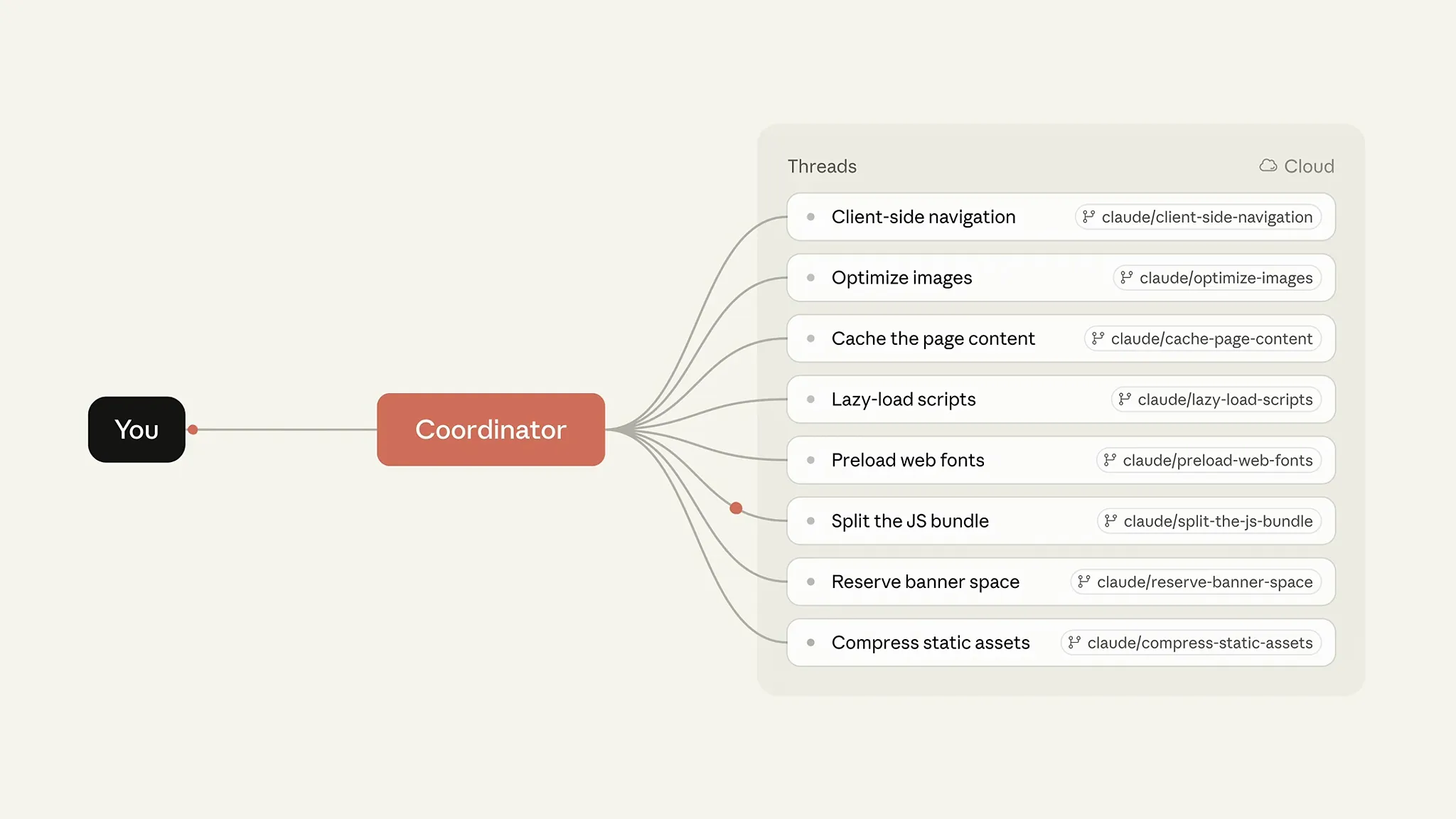
A project is a single conversation that directs multiple pieces of work. When a user states a goal and tasks, Claude acts as coordinator and starts a thread for each task; each thread is a cloud session working on its own branch and copy of the repository, and reports back when done. In its blog post the company explained that "Claude scopes the request, delegates the work, coordinates parallel threads, reviews the outputs, and assembles the finished result." METAL previously reported that on September 23 Anthropic let project threads run on users' own computers.
The four-minute walkthrough METAL reviewed uses a project to fix performance problems on a website as its example. A user creates the project from the Code tab in the desktop app or on the web by entering a name, a goal and the relevant repositories or folders, then hands over metrics and user feedback and asks Claude to explore the codebase; Claude inspects the repositories and reports what it found. Once the tasks are agreed, a thread starts for each, and when a thread has a bug fix ready it opens a pull request on its own, then fixes CI failures and addresses review comments. The demo closes by connecting a monitoring service and setting up a routine that checks for performance regressions every day, opening an investigation thread that waits for the user whenever it finds one.
The first tip from the Claude Code team in the video concerns cost. Every thread is a full Claude Code session and a project runs several at once, so it uses plan limits faster than a single session. Delba de Oliveira of the Claude Code team, who presents the video, advised: "Leave the coordinator on low effort. It mostly routes work, so a higher level won't get meaningfully better results." She also recommended defaulting threads to a smaller model and switching models inside a thread only for larger, more complex tasks.
The default settings lean heavier than that advice. According to the official documentation, a new project runs every thread on Opus at high reasoning effort and the coordinator conversation on Opus at low effort. The documentation notes that this setup draws on a plan fastest and recommends checking the thread model and effort under the General section of project settings before sending the first batch of work. Usage can be reviewed as token use by thread and by model in the Usage section of settings.
The documentation also spells out what happens at the limits. Across all projects, users can start up to 200 new threads per day. When a thread or the project conversation reaches the five-hour or weekly limit, it keeps retrying and resumes once the limit resets; only threads started by a routine stop with a limit error. An idle thread watching a pull request wakes up and uses the plan again when CI fails or a review comment arrives. On Pro and Max, sending follow-up work to a thread idle longer than the one-hour cache lifetime makes that thread re-read its entire conversation. A project with no running threads, no watched pull requests and no new messages uses no limits.
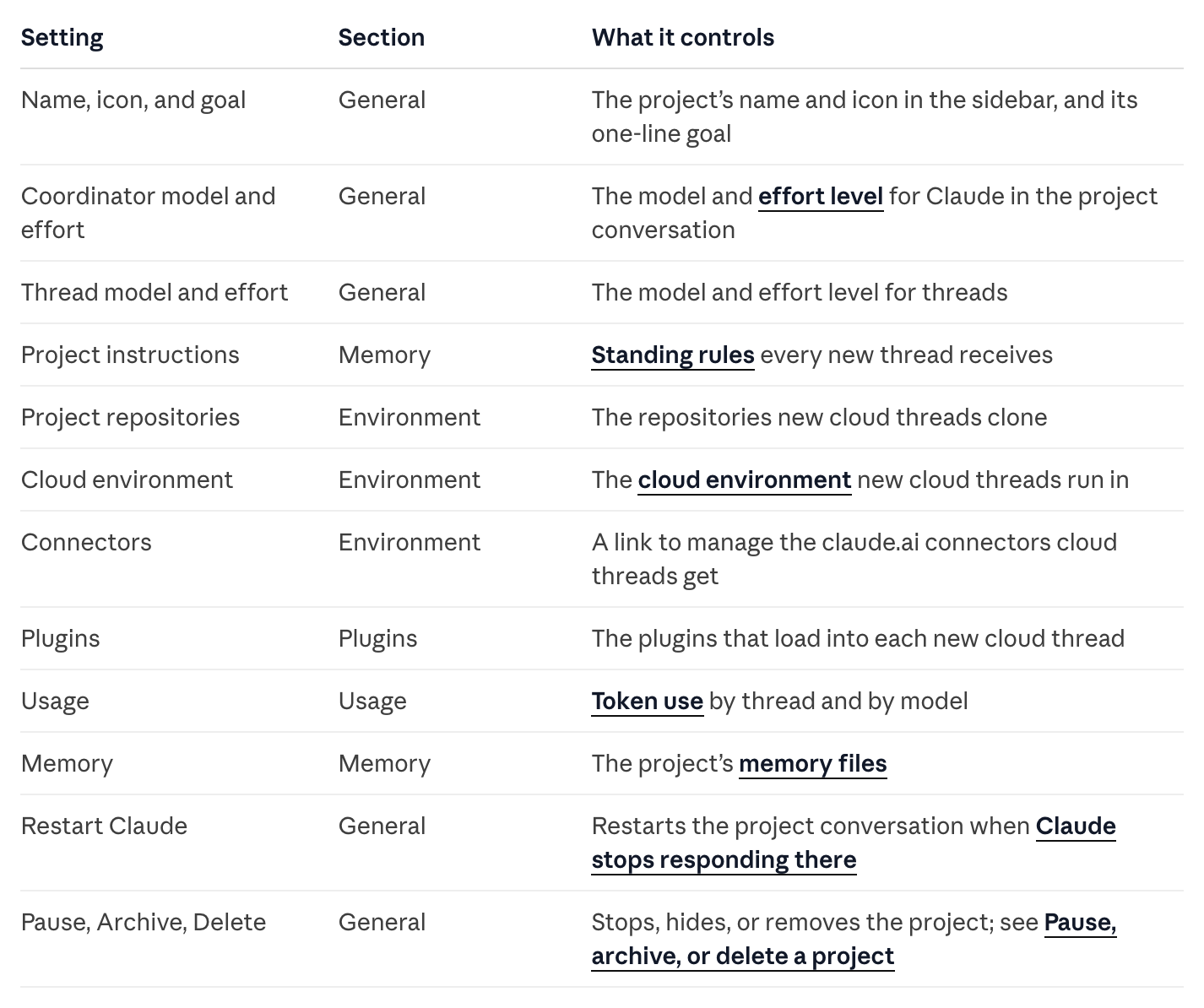
The second and third tips concern how a project is run. Users can set in conversation how many threads run at once, how often Claude posts updates and whether it shows a plan before starting, and threads share memory. According to the documentation, project memory is stored as files indexed by MEMORY.md that every cloud thread reads when it starts, and project instructions of up to 16,000 characters are sent to each new thread and to the coordinator. The documentation states that a thread limit set in conversation is an instruction Claude follows rather than an enforced cap.
Projects are available at claude.ai/code, in the Code tab of the desktop app and in the Claude mobile app for iOS and Android. They are not available in the terminal CLI, the VS Code extension or the JetBrains plugin, nor through Amazon Bedrock, Google Cloud's Agent Platform or Microsoft Foundry. Code work requires a repository on github.com with the Claude GitHub App installed, so repositories on GitHub Enterprise Server, GitLab or Bitbucket are not supported. On the same day, Anthropic put dynamic workflows for Claude Managed Agents into public beta, a form of multi-agent orchestration that developers build through the API and that shares the same logic as Projects.
Through a content marketer's lens, what stands out in this opening is less the feature than the way it is explained. Anthropic attached a demo video to the post letting in its waitlist and devoted the final part of that video to settings that save usage. The default is Opus at high effort, yet the company's own product team recommends a low-effort coordinator and smaller models for threads. The documentation warns directly that Pro users should expect to hit their limit sooner on days they run a project. With the waitlist now open, the metric users will watch is token use per thread, and the next test for the feature is whether costs grow faster than results when a goal bigger than one session is handed over.

Comments