


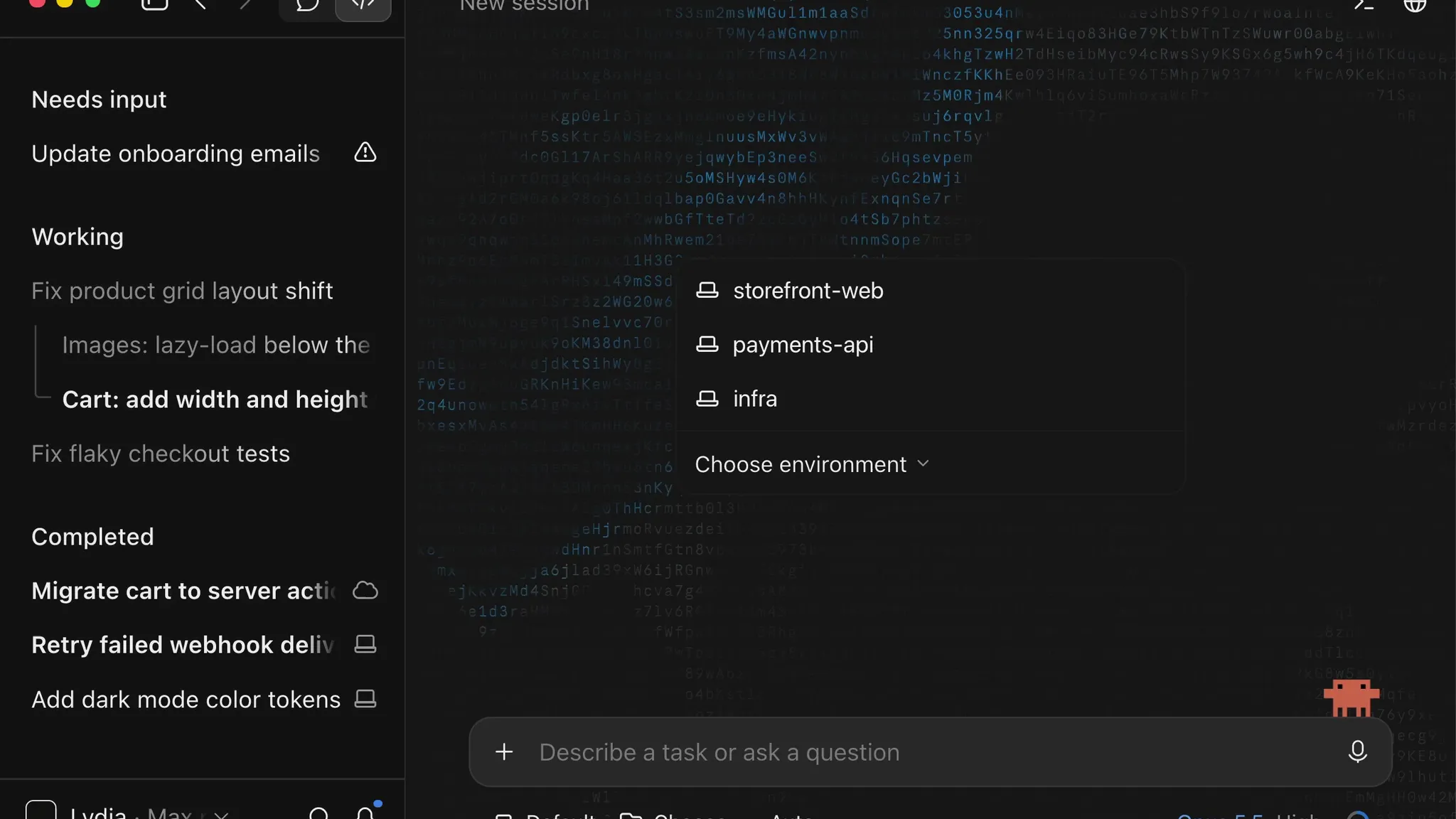
Image: @ClaudeDevs (X) (video still)
Summary
- Anthropic announced a revamp of parallel sessions in the Claude Code desktop app on October 14 (local time) through ClaudeDevs, the official X account for Claude developers.
- A new session screen opens sessions straight from recent folders or saved environments (folders, an SSH host or the cloud), and parallel work runs as one nested session per task that reports its result to the main session.
- The sidebar separates working sessions from those that need the user, and each session now has a live to-do list, a recap card and a side rail showing where it runs, its context and its changes.
Anthropic revamped parallel sessions in the Claude Code desktop app on October 14 (local time). ClaudeDevs, the official X account for Claude developers, introduced the changes in a five-post thread with a demo video. "We've been working hard on making the Claude Code desktop app great for running lots of sessions side by side," the company said, adding that sessions are now much quicker to start, work is easier to split across several of them, and users can always see what each one is doing. The first post passed roughly 190,000 views a little over an hour after it went up.
The starting point is the new session screen. According to Anthropic, it keeps recently used folders one click away. Users can save a setup such as several folders, an SSH host or the cloud as an environment and start sessions there directly, with the option of a separate Git worktree for each folder. The desktop documentation lists four execution environments to choose from before a session starts: Local on the user's own computer, Cloud sessions that keep running after the app is closed, remote SSH and WSL on Windows. Worktrees are stored by default in the .claude/worktrees/ folder at the project root.
The core change is how work gets divided. "When you ask Claude to run tasks in parallel, it starts a nested session for each one," the company said, explaining that each reports its result back into the main session when it finishes so the main thread stays readable. Claude also proactively suggests follow-up work while it runs, and users can launch that work as its own session with one click. The documentation describes these suggestions as task chips that surface out-of-scope fixes inside the conversation; clicking one starts the work in a new session with its own worktree while the current session continues uninterrupted. With the /btw command, side questions open in their own tab while the main session keeps going. Per the documentation, this side chat can read the main thread's context but adds nothing back to the main conversation, is available in local, SSH and WSL sessions, and is not saved to disk once the app closes.
The view across sessions has changed as well. "The sidebar makes it easy to see which sessions are working and which ones need you," Anthropic said. Inside a session, a live to-do list follows Claude's plan, a recap card sums up the turn when Claude needs the user, and a side rail shows where the session runs, its context and its changes. According to the documentation, Cmd+N opens a new session, and holding Cmd while clicking a session in the sidebar shows two sessions side by side. When a session the user is not viewing finishes a task, an operating system notification arrives.
The documentation also covers sessions talking to each other. Claude can list the local, SSH and WSL sessions the desktop app runs, read what each has done and send messages between them. By default it sees the 20 most recently active sessions and looks at archived sessions only on request. Before archiving any session, it always asks the user first, even in Auto and Bypass permissions modes. Cloud session usage counts toward subscription plan limits with no separate compute charges, and plan usage is shared across all Claude Code surfaces.
The desktop app has three tabs, Chat, Cowork and Code, and this revamp applies to the Code tab. According to the documentation, the Code tab requires a Pro, Max, Team or Enterprise subscription. Agent teams, in which Claude acts as a team lead assigning work to teammates from a shared task list, remain available only in the command-line tool (CLI); for multi-agent work inside a single session, Desktop points users to dynamic workflows. Anthropic said users can try the features by updating the desktop app and starting a new session.
METAL previously reported that Anthropic opened Claude Code projects to everyone on the waitlist, and this revamp follows that feature for grouping cloud sessions by refining the parallel work screen on the user's own computer. In the 10-second demo video METAL reviewed, the sidebar sorts sessions into three groups, needs input, working and completed, and subtasks such as lazy-loading images and fixing the cart hang beneath a working session.
The center of gravity in this change is the management screen rather than model performance. As a single developer runs more agents at once, the bottleneck shifts from how fast code gets written to keeping track of which session is doing what and which one is waiting for a human decision, and Anthropic has chosen to cut that cost with the sidebar, recap cards and nested sessions.

Comments