


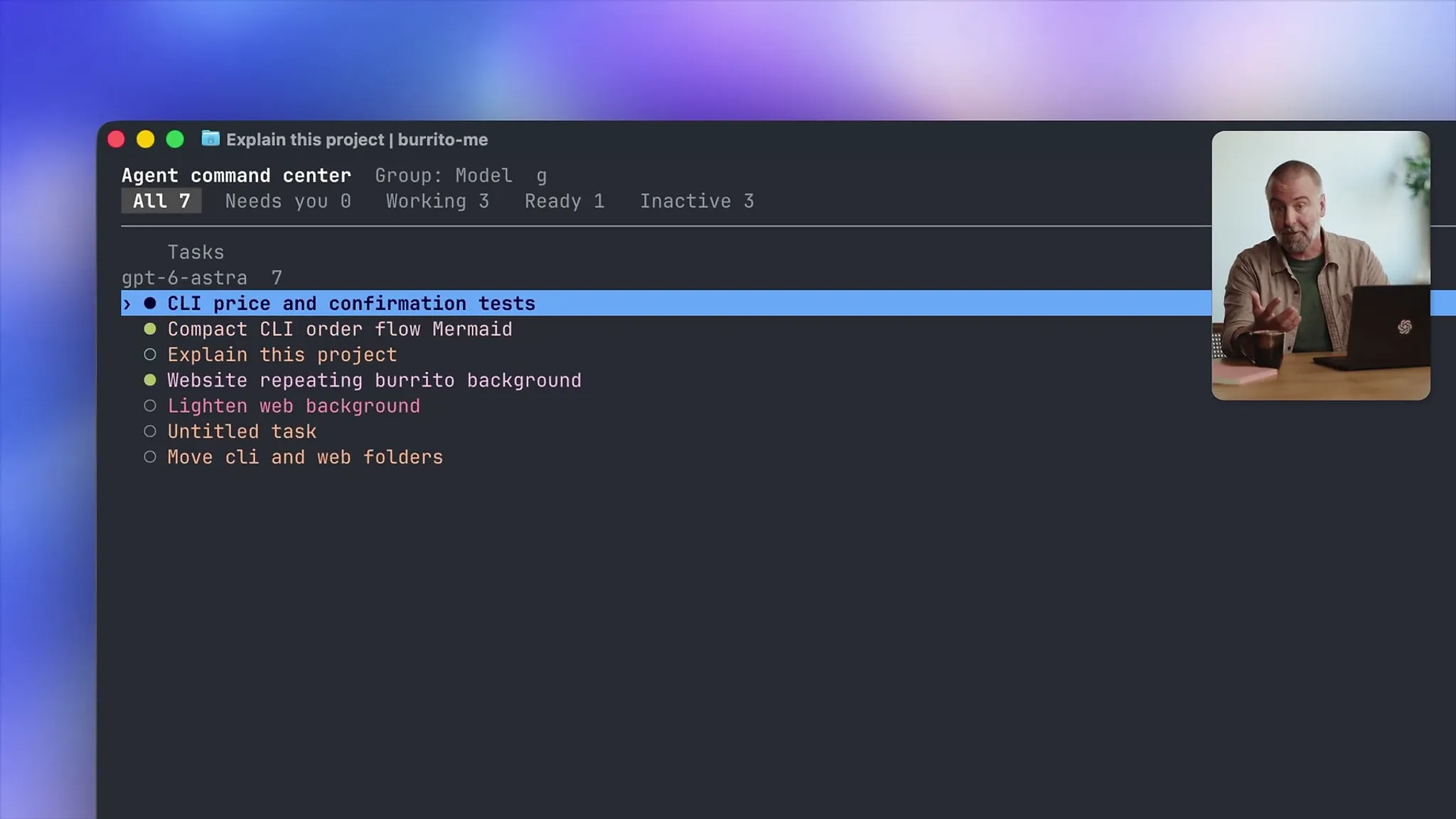
Image: @OpenAIDevs (X) (video still)
Summary
- On October 5 (US time), OpenAI posted a demo video on its official developer X account showing terminal-based Codex's voice task assignment, agent management screen, and worktree forking.
- The fullscreen interface, voice conversations, /usage dashboard, and Mermaid and equation rendering shown in the video shipped across five version updates, from 0.156.0 on September 22 to 0.160.0 on October 1.
- With remote control from a phone, developers can check progress and answer agent questions while away from their desks, turning the command-line tool into a workspace for directing multiple agents.
OpenAI released a demo video bringing together new features of Codex CLI, its coding agent for the terminal, on its official developer X account on October 5 (US time). The video walks through starting work by voice, managing agents scattered across multiple projects from a single screen, and forking the same conversation into a separate worktree to try a different direction. "If you live in the terminal, this one's for you," the OpenAI Developers account said in the post. The post drew about 49,700 views in a little over five hours.
Most of the features in the video shipped one after another over the past two weeks. According to the official Codex changelog reviewed by METAL, OpenAI bumped the CLI's minor version five times in the ten days from 0.156.0 on September 22 to 0.160.0 on October 1, and on October 5 released 0.160.1, which fixed an environment-variable issue with remote MCP servers on Windows. The starting release, 0.156.0, alone listed 525 changes. The video is less a new launch than a roundup that ties features released in pieces into a single workflow.
The demo opens on a light note. Craig Dennis, who works on Developer Experience at OpenAI and hosts the video, says he built a CLI that orders his usual burrito with a single command, and that because people around him want in, he is building a web page so they can install it. "You want Codex to feel fast and stay out of your way," he said at the start of the video, explaining that the direction of these features is to let users build where they like to work.
The first screen is the fullscreen interface. Even when scrolling back through earlier output, the input box for the next message stays pinned at the bottom. According to the changelog, this screen arrived in 0.156.0 as an option selectable with the /tui command, and fullscreen transcripts became the default in 0.157.0 on September 25. Transcript search, mouse selection, and right-click copying came with it, and 0.158.0 added copy-on-select and copying that preserves Markdown formatting.
Next comes voice. The host turns on voice mode and assigns three tasks at once by speaking: add a repeating burrito background to the website, add tests for price changes and order confirmation to the CLI, and draw the order flow as a Mermaid diagram. Once he mutes the voice, three tasks start running at the same time across two projects. Voice conversations were turned on by default in 0.156.0, toggled with the F8 key, with a voice chosen from the /voice menu. Voice runtimes for Linux and Windows were also bundled into the install.
As tasks multiply, managing them becomes the problem. In the video, pressing the left arrow opens the agents screen, and the screen METAL reviewed in the video showed seven tasks split into three working, one ready, and three inactive. From there, Dennis filters running tasks, groups them by status, searches, and jumps straight into the one he wants. He stressed that there is no need to hunt through the file system or open separate terminal windows. OpenAI calls this screen the agent command center; it added status filters and worktree session creation in 0.156.0, and a keyboard action for loading older tasks in 0.160.0.
Worktree forking is the most practical part for developers. The host explains that if he wants to try building in a different direction, he can fork the conversation into a new worktree with the same context but a completely separate checkout. It lets developers change the same repository along two paths at once and keep the better one. Worktree support has been on by default since 0.156.0, and 0.157.0 added an f shortcut that forks a conversation open in another app while carrying over in-progress drafts and queued prompts.
Work also continues while the developer is away. The host demonstrated that turning on remote control on his laptop and choosing that computer on his phone brings up the same task list, where he can check progress and answer the agent's questions. According to the official changelog, remote control links each iOS or Android device to each host through authenticated one-to-one QR pairing, and Windows devices are supported as well. Back at the terminal, finished tasks and tasks that need attention are shown separately.
The last part covers records and graphics inside the terminal. The /usage dashboard introduced in 0.156.0 shows account usage, token totals, top chats, plugins, and skill activity. Mermaid diagrams and equations in responses also render directly in the terminal; in the video, the order flow diagram assigned by voice appears on screen along with a LaTeX proof of why burritos rule. Mermaid rendering expanded in 0.158.0 and 0.159.0 to support quoted labels, more kinds of edges, and node groups.
Model changes overlapped in the same period. On September 22, OpenAI brought GPT-6 Sol and GPT-6 Luna to Codex, selectable in the CLI with the /model command or the codex --model option, and announced that GPT-5.5 will retire from ChatGPT and Codex on October 14. METAL previously reported on OpenAI introducing Codex CLI as an open-source coding agent that runs in the terminal, and in the two months since, the CLI has changed from a single-command tool into a workspace for directing multiple agents.
From a reporter's view, what this video signals is less a feature list than the product's center of gravity. Even with a desktop app and IDE extension available, OpenAI made a video aimed specifically at terminal users and pulled features far removed from the terminal, such as voice and remote control, into it. At the end of the video, Dennis said "we want Codex to meet you where you are and let you keep focusing on what you're building," adding that the team will keep improving the CLI and asking for feedback. If the pace of five version bumps in ten days continues, the developer's terminal will shift from a place to type code to a place to hand out work to agents and review the results.


Comments