


Summary
- OpenAI opened shareable profiles in ChatGPT, letting users showcase up to 12 Sites they built and display their most-used plugins.
- Profiles show Chat message counts, Work and Codex token usage and activity streaks, but not conversation titles or content.
- Personal profiles are private by default, while ChatGPT Business profiles are shared within the workspace by default, with admins setting the sharing level.
OpenAI has opened shareable profiles in ChatGPT. The feature gathers the Sites a user built inside ChatGPT and the plugins they use most on one page so others can find and reuse them. OpenAI's developer account announced it on X on September 30 (local time) with a demo video, saying "Built it? Show it off." The features announced at DevDay are rolling out gradually, so some accounts cannot see it yet.
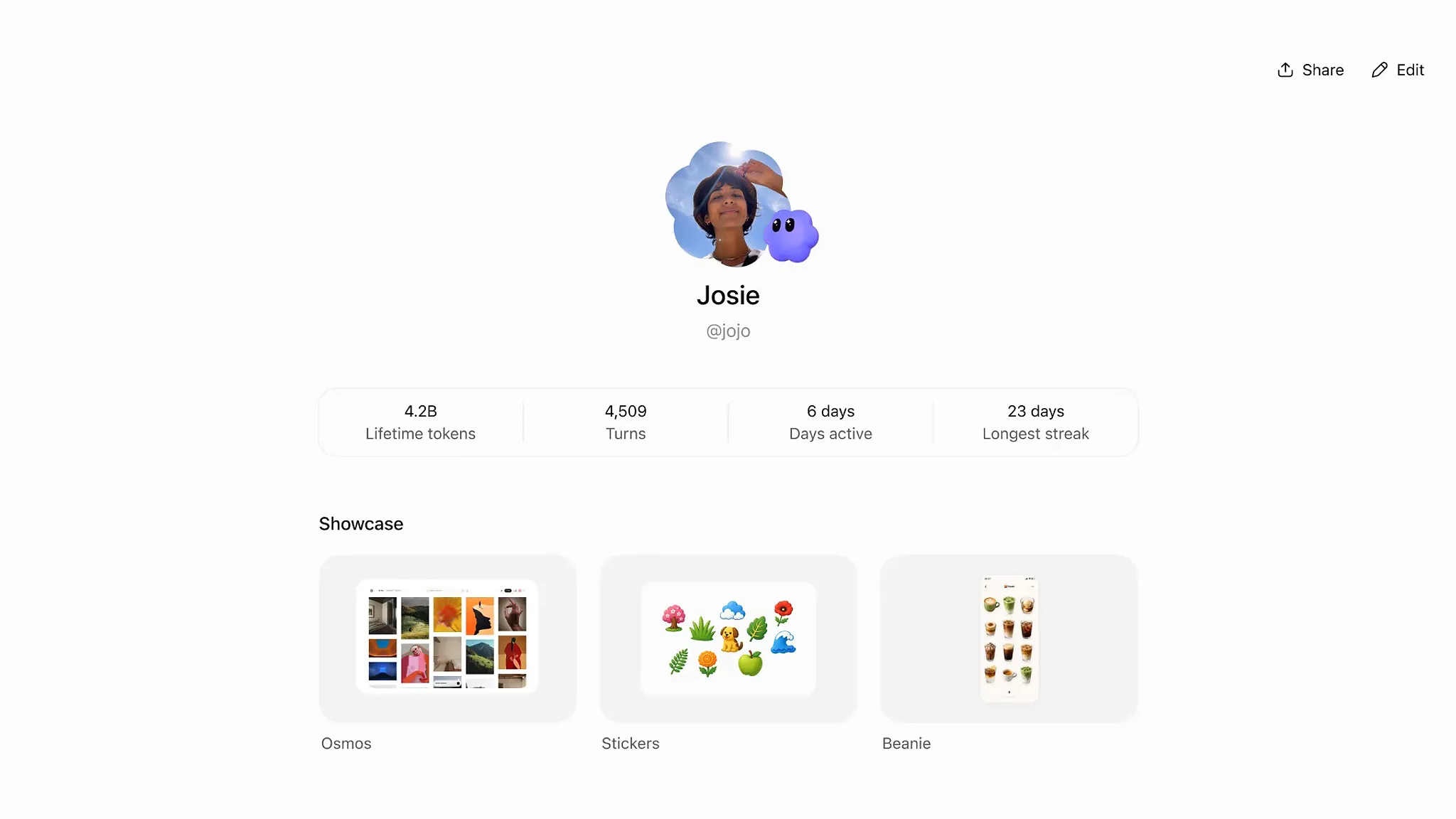
A profile brings together a name, photo, activity and the Sites the user chooses. According to OpenAI's help documentation, users can showcase up to 12 Sites they own on each profile and decide the order or remove them. Shareable profiles are available in all countries and work on web and desktop. The showcase is not yet supported on mobile.
Activity is shown as numbers. A profile displays Chat message counts, Work and Codex token usage and activity streaks. Message counts and token usage are shown separately, with daily, weekly and cumulative totals. A day with Chat messages or Work or Codex token activity counts toward the streak, and a day with both counts only once. The most-used plugins appear in a separate section.
Personal profiles are private by default. Making one public creates a link in the format chatgpt.com/u/username, and anyone signed in to ChatGPT can view it. People who are not signed in cannot. Shared profiles do not show conversation titles or conversation content. Changing the username stops the old link from working, and there is no way to block specific people. To keep people from viewing it, the whole profile has to be made private again.
Company accounts work the other way. ChatGPT Business profiles are shared with members of the same workspace by default, and only admins can change the sharing level. Admins can also make all member profiles private from the permissions menu in workspace settings. Members cannot change the sharing level of their own workspace profile. People outside the workspace cannot view its Business profiles, and making a personal profile public does not make company workspace activity or showcase public. Shareable profiles for Enterprise are coming soon.
Sharing levels and Site access permissions are linked. A public personal profile can include only public Sites, and a shared Business profile can include only Sites open to the whole workspace or public. Adding a Site to the showcase does not change who can access it. If a Site's permissions later narrow so that profile visitors can no longer access it, the Site disappears from the shared profile, and Sites that are deleted or transferred to another owner are removed from the showcase.
Skills are handled differently. The official ChatGPT account on X said, "Teammates can discover your shared skills, too—those stay within your workspace." The help documentation also states that skills cannot be shared on a personal profile. What users can show off externally are Sites and plugins, while skills that hold work procedures stay inside the company.
According to reports, OpenAI first unveiled shareable profiles at DevDay 2026 on September 29 and at the same event added the ability to embed connected plugins directly in Sites, along with per-user permissions. Several people can use an app hosted on one Site while keeping their own accounts. New plugin extension types such as sidebar apps, conversation panels and file viewers were also announced. METAL previously reported that OpenAI connected plugins to ChatGPT Voice. After conversation and voice, plugins have now reached the profile, the face a user presents.
The OpenAI demo video reviewed by METAL starts at the share button on the profile page, chooses between two levels, "Only visible to you" and "Anyone with a link," and ends by copying the link. The share window places buttons for X, LinkedIn and Reddit side by side. What this feature changes is the nature of using ChatGPT. A conversation tool people used alone is moving toward a marketplace where they show what they made and others take it to use, and what goes on that shelf alongside the work are numbers: token usage and activity streaks.



Comments