


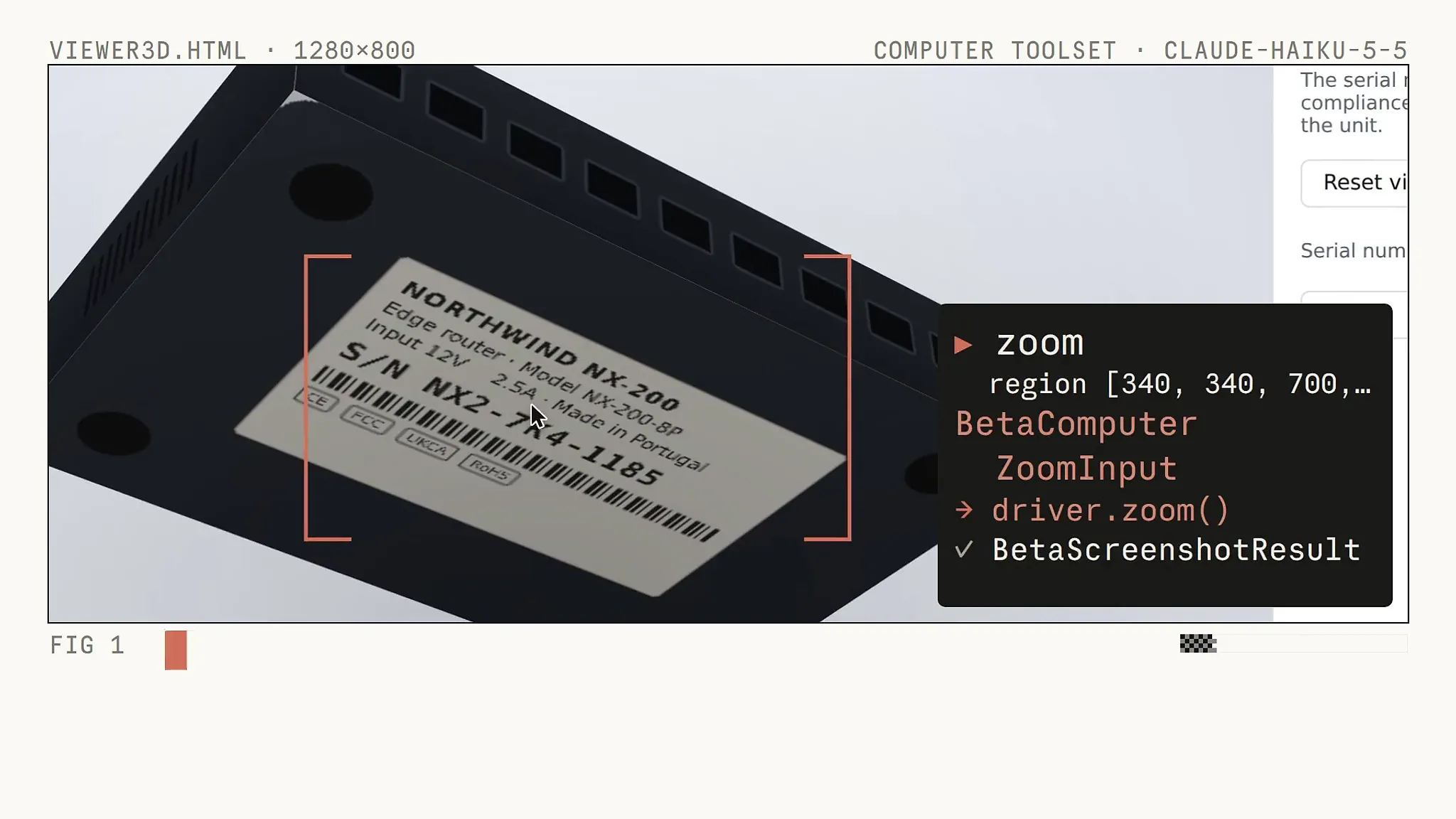
Image: @ClaudeDevs (X) (video still)
Summary
- On October 7, Anthropic added beta classes for the browser use and computer use tools to Claude's Python and TypeScript SDKs.
- Developers subclass one and write a method per tool, and the SDK handles call routing, policy checks, the approval callback and building results.
- The SDK ships no browser, desktop, driver or URL policy, and of the six security steps its documentation recommends, the SDK applies only three itself.
Anthropic has built computer use and browser use toolsets into the Python and TypeScript SDKs for Claude. The company announced on October 7, through the Claude Platform release notes and its official developer account on X, that both SDKs now include classes, in beta, for the browser use tool and the computer use tool. A developer subclasses one and writes a single method per tool; the SDK then sends each of Claude's calls to the right method and takes care of policy checks, the approval callback and building the result blocks. The agent loop that developers used to write by hand is now run by the SDK.
"The API tells you what Claude wants to click or type," Anthropic's developer account explained in its post on X. "Previously, you had to write your own loop and map clicks and keystrokes to commands, but the SDKs now run the loop and send actions to drivers," it said. A driver here is the developer's own subclass, the code that actually moves a browser or a desktop. According to the official documentation, the SDK includes no browser, no desktop, no ready-made driver and no URL policy.
The new classes are named BetaAbstractBrowserToolset20260801 and BetaAbstractComputerToolset20260801. The date at the end of each name points to the API toolset versions released in August. On August 19, Anthropic moved the computer use tool out of beta as computer_toolset_20260801 and launched browser_toolset_20260801 for driving a browser that an application hosts. METAL has previously reported that Anthropic made Claude's computer use and browser tool generally available. Opus 5.5, released on September 22, accepts only the new toolset for computer use on the Claude API and Google Cloud, and the earlier computer_20251124 tool returns a 400 error. The new SDK classes are an execution layer on top of that API.
The starting point is example code. The Claude quickstarts repository holds, in Python and TypeScript, a browser example that controls Chromium through the Chrome DevTools Protocol (CDP) and a desktop example that drives a screen over VNC. The documentation states that neither is production code. A member tool the developer does not implement is sent to the API as disabled, and if Claude calls it anyway, the SDK returns an error and the run continues. The tool runner never closes the toolset, so one instance can serve several runs.
The computer toolset consists of 17 tools, including screenshot, click, typing and zoom. If a class implements type, key or hold_key, the constructor only accepts it when a confirm callback is passed or those tools are switched off. The coordinates Claude sends are pixel positions in the screenshots the developer returns, and the SDK neither reads nor resizes images. If the screen and the screenshots differ in size, converting coordinates is the driver's job.
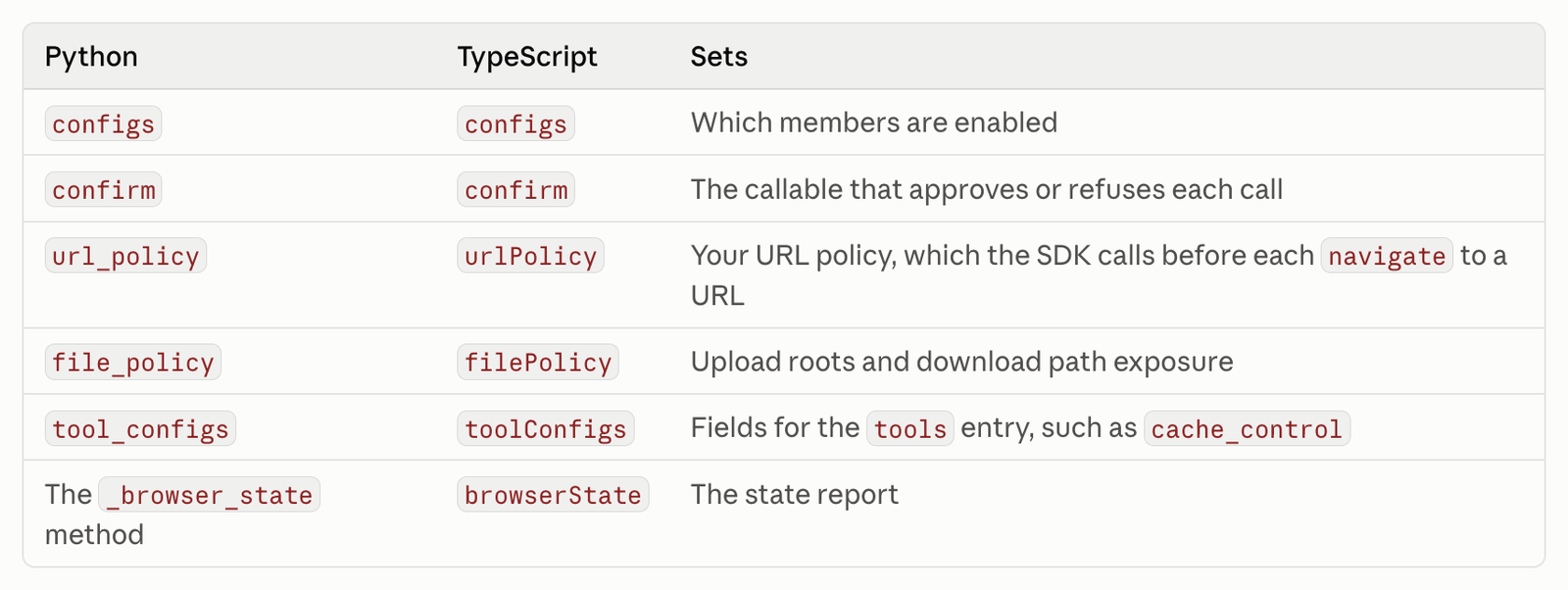
The browser toolset has more settings. Its constructor takes configs to switch members on and off, confirm to approve or refuse each call, url_policy to check an address before navigation, file_policy to confine upload paths and tool_configs for fields of the tools entry, and a state report method tells Claude about changes such as open tabs and downloads. According to the partner documentation, there are 31 browser actions in all, and 27 are on by default. javascript_exec, which runs scripts inside the page, and file upload are off by default, and turning either on without passing an approval callback raises a configuration error.
Most of the security design is left to developers. Before running a driver against anything but a throwaway browser, the documentation recommends six steps: a URL policy that blocks addresses the task does not need, request interception in the driver, an egress policy on the container, limits on uploads and downloads, approval for actions with real effects, and isolating each session in a dedicated container or virtual machine. Of these, the SDK itself applies only steps 1, 4 and 5. Passing None as url_policy makes the SDK refuse every navigation, and the documentation advises blocking private ranges including the cloud metadata address 169.254.169.254.
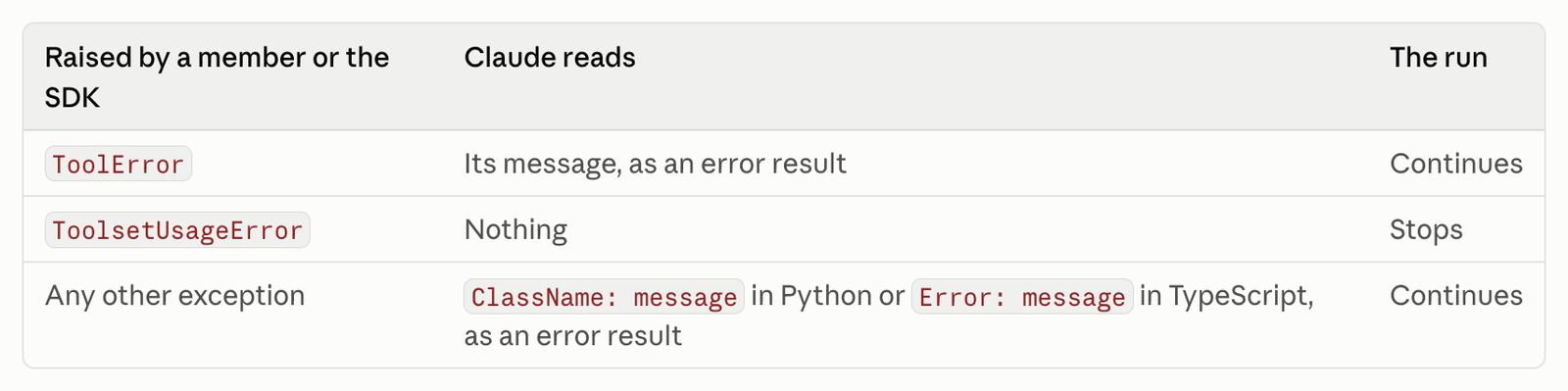
The way calls run can also change. With stream and run_tools_eagerly turned on in the tool runner, a browser or computer call can start while Claude's response is still streaming. Approval and policy checks still run first, but a call that has started cannot be taken back even if the response is cut off at max_tokens. Calls on one toolset run one at a time in the order Claude wrote them, and once a call fails, the rest of that turn's calls are not executed. When a driver raises ToolError, Claude reads the message and the run continues, while ToolsetUsageError, a configuration error, stops the run.
Outside companies have released integrations as well. The official documentation notes that Browser Use, Browserbase, Daytona and E2B have published integrations with the SDK toolsets. The Browser Use integration runs on version 0.13.11 or newer and Python 3.11 or newer, and can use its own cloud browser, local Chromium or an already running CDP browser. The example in its documentation has Claude Opus 5.5 read the first three Hacker News posts and save their titles and URLs as Markdown and JSON files.
The 60-second demo video, which METAL reviewed, runs three scenes with the Haiku 5.5 model. In a 3D viewer, it zooms twice into the underside of a device, reads the serial number NX2-7K4-1185, types it into a field and saves it. On a map, it finds a harbor marker by scrolling and dragging, then clicks it. On a customer relationship management (CRM) screen, the browser toolset's read_page attaches a reference to every field, and form_input fills in the contents of handwritten cards without coordinates or keystrokes. The video also shows a click failing on a stale reference, raising a ToolError, and find locating the button again. According to the video, processing three handwritten cards took 67 calls and 46 seconds, with no typos.
From an engineering standpoint, the change shifts where responsibility sits more than it cuts code. The repetitive work of mapping state to commands has moved into the SDK, and what remains is drawing the boundaries of the network, files and keyboard input a driver can reach. One developer replying to the announcement post noted that pulling the loop into the SDK "shifts the engineering bottleneck from state mapping to sandbox isolation." Since the documentation itself says the approval callback sees only the tool name and its input, not the screen, picking out clicks such as payments or sent messages also depends on the developer's design. What a team building agents has to decide first is not the model but how far its driver is allowed to reach.

Comments