


요약
- 수노가 음악 편집 도구 Suno Studio의 2.0 버전을 내놓으며 MIDI 지원을 처음 추가했다
- 서드파티 플러그인·VST는 아직 지원하지 않아 자체 내장 신스로만 편집해야 한다
- 올여름 애플 앱스토어 음악 앱 1위를 지킨 수노가 신뢰 확보를 위한 행보를 이어가는 흐름 위에 있다
- 제품
- Suno Studio 2.0 (2026년 8월 13일 공개)
- 핵심 추가 기능
- MIDI 지원 — 수노가 밝힌 이용자 최다 요청 기능
- 한계
- 서드파티 플러그인·VST 미지원, 자체 내장 신스만 사용 가능
- 신스 사양
- 2-오실레이터 웨이브테이블 신스, 엔벨로프 3~4개 수준으로 알려짐
- 배경 1
- 수노, 올여름 애플 앱스토어 음악 앱 1위 여러 주 유지(블룸버그 인용, 2026-08-13 확인)
- 배경 2
- 수노, 지난 8월 6일 워터마킹·핑거프린팅 등 책임있는 AI 음악 원칙 공개
- 배경 3
- 기타 부품업체 D'Addario, 홍보 영상에 수노 음악 몰래 썼다가 2주 만에 시인(2026-08-12)
MIDI, 마침내 들어왔다
수노가 자사 음악 편집 도구 Suno Studio의 새 버전 2.0을 내놨다. 가장 큰 변화는 MIDI 지원이다. MIDI는 음의 높낮이와 길이, 세기 같은 연주 정보를 담아 악기 소리를 자유롭게 바꿔 끼울 수 있게 하는 표준 규격으로, 사실상 모든 현대적 음악 제작 프로그램(DAW·디지털 오디오 워크스테이션)의 기본 전제 조건이다. 수노는 MIDI가 이용자들이 가장 많이 요청한 기능이었다고 밝혔다. 지금까지 Suno Studio는 AI가 뽑아낸 결과물을 다듬는 정도의 편집기에 가까웠다면, 이번 업데이트로 음 하나하나를 직접 그리고 고치는 작업이 가능해진 셈이다.
신스는 있지만 플러그인은 없다
다만 아직 서드파티 플러그인이나 VST는 지원하지 않는다. VST는 음악 제작자들이 즐겨 쓰는 외부 가상 악기·이펙트 플러그인 표준으로, 이걸 지원하지 않으면 이용자가 평소 쓰던 신스나 이펙터를 그대로 가져올 수 없다. 대신 수노는 자체 내장 신스만 제공하는데, 이 신스는 두 개의 오실레이터로 소리를 만드는 웨이브테이블 방식에 엔벨로프(소리의 시간에 따른 변화를 조절하는 기능) 몇 개가 붙은 비교적 단순한 구성으로 알려졌다. 유명 빈티지 신스 플러그인을 흉내 내려는 도구가 아니라, MIDI로 그린 멜로디를 최소한으로 다듬을 수 있게 해주는 정도로 봐야 한다.
| 항목 | Suno Studio 2.0 | 전통적 DAW(예: Ableton, Logic) |
|---|---|---|
| MIDI 편집 | 신규 지원 | 기본 지원 |
| 서드파티 플러그인·VST | 미지원 | 지원 |
| 내장 신스 | 2-오실레이터 웨이브테이블 1종 | 다수의 서드파티 신스 활용 가능 |
왜 지금 '진짜 DAW'를 노리나
수노가 편집 기능을 강화하는 시점이 공교롭다. 수노는 올여름 애플 앱스토어 음악 앱 부문에서 여러 주간 1위를 지켰다고 블룸버그를 인용해 밝힌 바 있다. 텍스트만 입력하면 노래가 나오는 방식이 입소문을 타면서 다운로드가 급증했다는 것이다. 동시에 지난 8월 6일에는 오디오 워터마킹과 핑거프린팅 기술 도입을 예고하고, 특정 아티스트 이름을 프롬프트로 쓰지 못하게 막는 등 무단 복제 방지 원칙을 공개하기도 했다. 여기에 기타 부품업체 D'Addario가 홍보 영상에 수노 음악을 몰래 썼다가 2주 만에 시인한 사건도 겹쳤다. 인기는 늘었지만 "AI가 뚝딱 만든 노래"라는 꼬리표를 떼야 하는 압박도 함께 커진 셈이다. Studio 2.0의 MIDI 지원은 이 흐름과 맞닿아 있다 — 결과물을 그대로 쓰는 도구가 아니라, 프로듀서가 직접 손을 대는 제작 도구로 자리를 옮기려는 시도다.
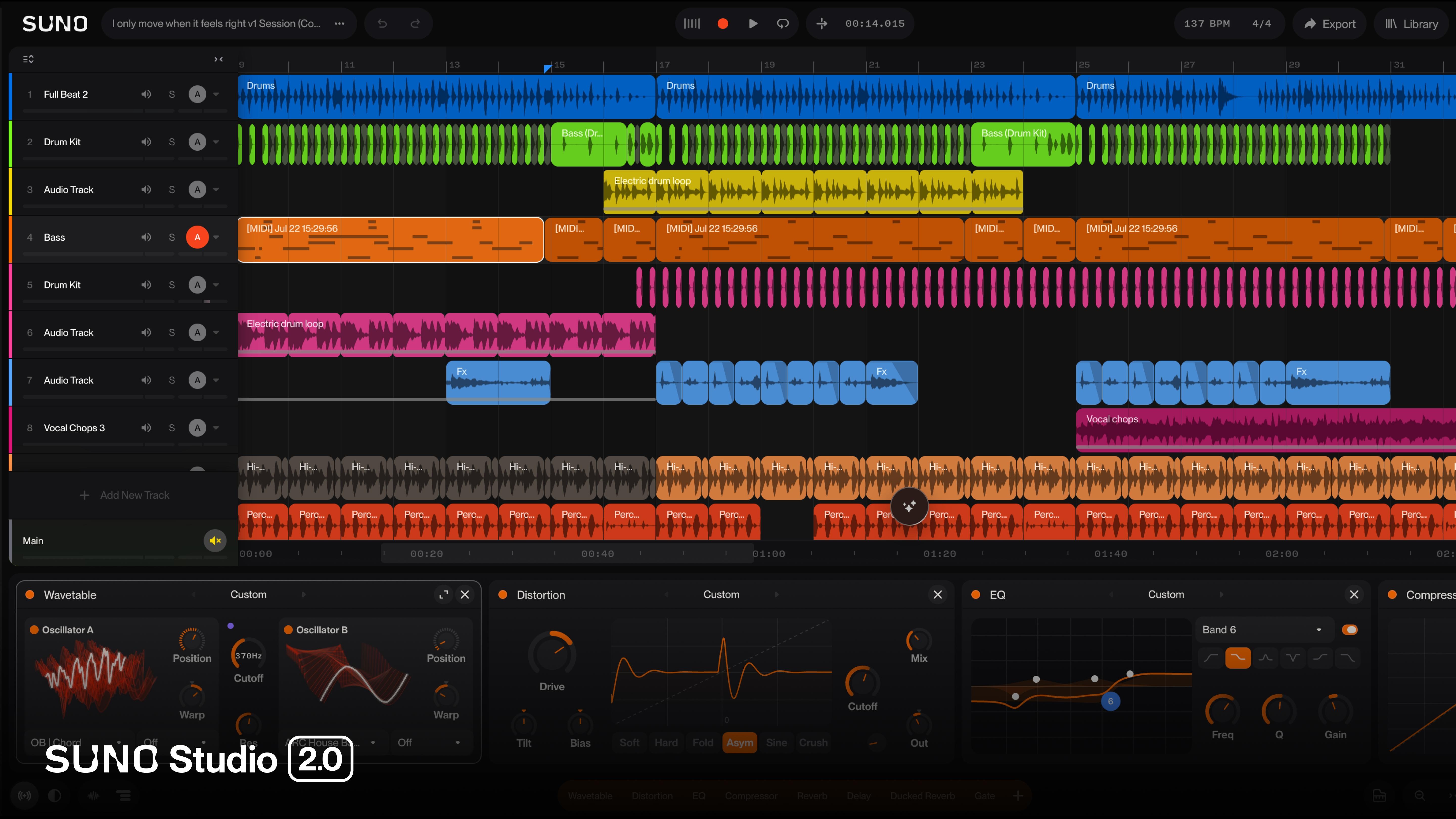
어떻게 써보나
원문에는 세부 진입 경로가 구체적으로 공개되지 않았지만, Suno Studio가 수노 플랫폼 내 편집 도구로 존재해온 만큼 2.0 업데이트도 같은 경로로 적용될 것으로 보인다. 확인된 기능 범위 안에서 예상되는 작업 흐름은 다음과 같다.
- Suno Studio에서 AI가 생성한 곡을 불러온다.
- 새로 추가된 MIDI 트랙을 열어 멜로디나 코드를 음표 단위로 직접 수정한다.
- 내장된 2-오실레이터 웨이브테이블 신스로 음색을 조절한다.
예를 들어 AI가 만든 반주에서 특정 구간의 음정이 마음에 안 들 때, 예전에는 프롬프트를 바꿔 처음부터 다시 생성해야 했다면 이제는 MIDI 노트를 직접 옮겨 고칠 수 있다. 다만 좋아하는 외부 신스나 이펙트 플러그인을 그대로 가져다 쓰려는 이용자라면 아직은 기대에 못 미칠 수 있다.
그래서 무엇이 달라지나
지금까지 수노는 "몇 문장 입력하면 노래가 나온다"는 자동생성 도구로 소비돼 왔다. MIDI 편집 기능은 그 결과물을 사용자가 손으로 만질 수 있게 문을 열어준 것이다. 완결된 결과물을 통째로 받아쓰는 방식에서, AI가 초안을 주고 사람이 다듬는 방식으로 넘어가는 흐름과 맞물린다. 다만 VST 미지원이라는 한계가 그대로 남아 있는 한, 전문 프로듀서들이 기존 작업 환경을 수노로 완전히 옮기기는 아직 이르다는 평가가 나올 만하다.


댓글