


Summary
- Suno has released version 2.0 of its music editing tool, Suno Studio, adding MIDI support for the first time
- Third-party plugins and VSTs are still not supported, so editing must be done with the built-in synth alone
- The move comes as Suno, which topped Apple's App Store music charts all summer, continues efforts to build trust
MIDI finally arrives
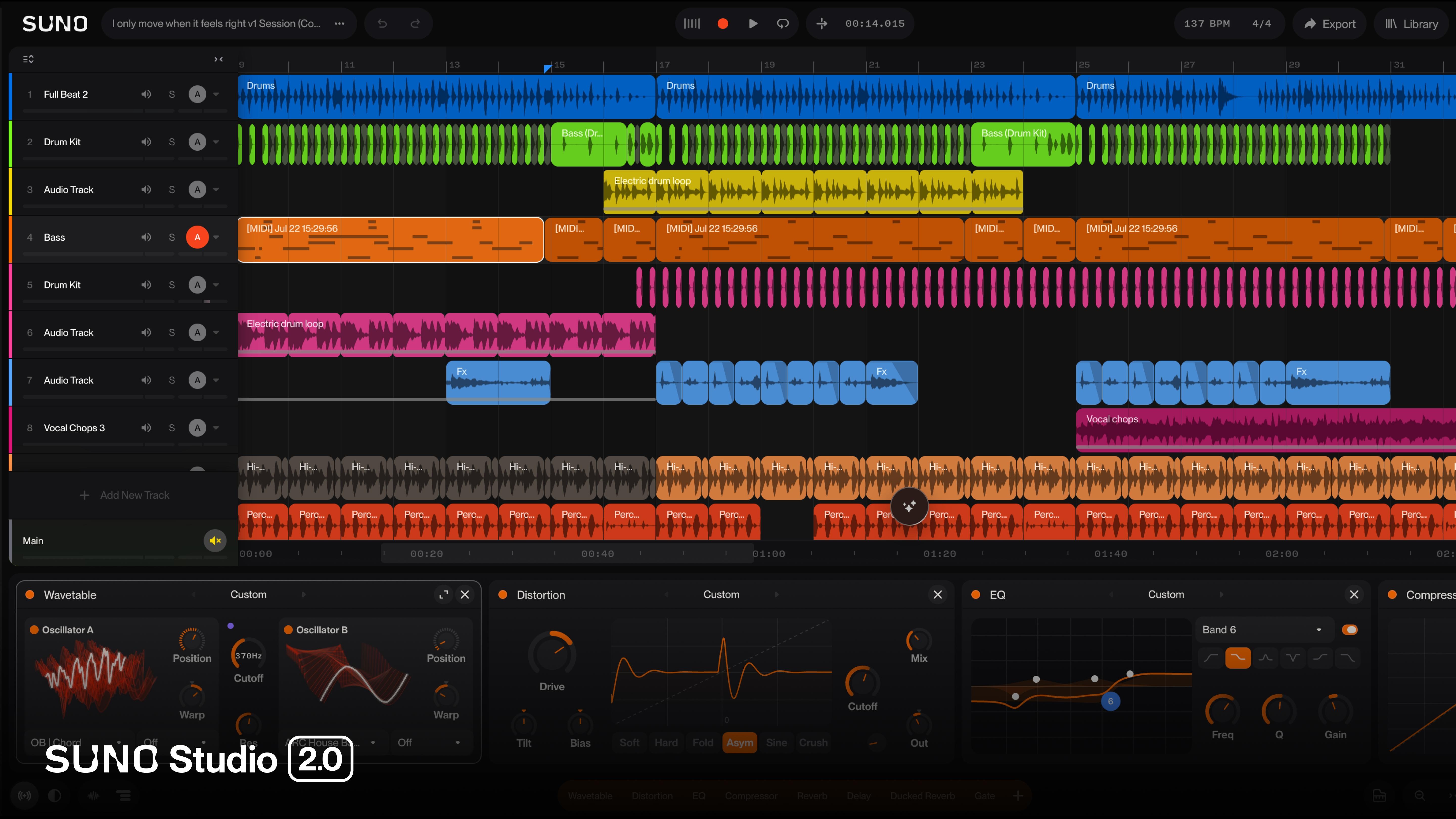
Suno has released a new version of its music editing tool, Suno Studio, version 2.0. The biggest change is MIDI support. MIDI is a standard format that encodes performance information such as pitch, duration, and velocity, allowing instrument sounds to be freely swapped in and out — it's essentially a baseline requirement for virtually every modern music production program (DAW, or digital audio workstation). Suno said MIDI was the most-requested feature among its users. Until now, Suno Studio functioned more as an editor for polishing AI-generated output, but this update makes it possible to draw and correct individual notes directly.
A synth, but no plugins
That said, third-party plugins and VSTs are still not supported. VST is a standard for external virtual instrument and effect plugins favored by music producers, and without support for it, users cannot bring in the synths or effects they're used to working with. Instead, Suno offers only its own built-in synth, which is reportedly a relatively simple setup — a wavetable design that generates sound from two oscillators, with a handful of envelopes (which control how a sound changes over time) attached. It's not a tool meant to emulate famous vintage synth plugins, but rather one intended to allow minimal shaping of melodies drawn in via MIDI.
| Item | Suno Studio 2.0 | Traditional DAW (e.g., Ableton, Logic) |
|---|---|---|
| MIDI editing | Newly supported | Standard feature |
| Third-party plugins/VST | Not supported | Supported |
| Built-in synth | One 2-oscillator wavetable synth | Access to numerous third-party synths |
Why aim for a "real DAW" now
The timing of Suno's push to strengthen its editing features is notable. Suno has said, citing Bloomberg, that it topped Apple's App Store music category for several weeks this summer. Word-of-mouth around its text-to-song format reportedly drove a surge in downloads. At the same time, on August 6, Suno announced plans to introduce audio watermarking and fingerprinting technology, and unveiled anti-copying principles such as blocking the use of specific artist names in prompts. Adding to this, guitar parts maker D'Addario was found to have secretly used Suno-generated music in a promotional video, an incident it admitted to two weeks later. As popularity has grown, so has the pressure to shed the "song thrown together by AI" label. MIDI support in Studio 2.0 fits into this trajectory — an attempt to shift from being a tool whose output is used as-is, to a production tool that producers actively work with by hand.
How to try it
The source material doesn't specify the exact access path in detail, but since Suno Studio has existed as an editing tool within the Suno platform, the 2.0 update is likely to be accessed the same way. Based on the confirmed feature set, the expected workflow is as follows.
- Load an AI-generated track into Suno Studio.
- Open the newly added MIDI track and edit the melody or chords note by note.
- Adjust the tone using the built-in 2-oscillator wavetable synth.
For example, if a particular section's pitch in an AI-generated backing track doesn't sound right, previously users would have had to change the prompt and regenerate from scratch — now they can directly move and fix MIDI notes. However, users hoping to bring in their favorite external synths or effect plugins as-is may still find this falls short of expectations.
So what actually changes
Until now, Suno has largely been used as an auto-generation tool — type a few sentences and get a song. The new MIDI editing feature opens the door for users to manually work with that output. It reflects a shift away from simply receiving a finished product wholesale, toward a workflow where AI provides a draft and a human refines it. Still, as long as the lack of VST support remains, it's reasonable to expect that it's too early for professional producers to fully move their existing workflows over to Suno.


Comments