



Image: METAL
Summary
- OpenAI on October 9 unveiled a Codex sandbox mode for Windows based on Microsoft MXC; it requires a compatible Windows 11 device.
- MXC uses operating-system process isolation to enforce file and network permissions on commands and their child processes, without administrator-approved setup, separate Windows accounts or local firewall rules.
- Consumer accounts in the desktop app pick MXC automatically, enterprise and CLI users turn it on with prefer_mxc = true, and organizations can block it with allow_mxc = false.
AI company OpenAI has released a new sandbox mode for its coding agent Codex on Windows. The mode is built on MXC (Microsoft Execution Containers), the agent containment technology Microsoft made generally available on October 7, and OpenAI's developer account said on October 9 that it offers faster setup, stronger network enforcement and more granular control over file access. It requires a compatible Windows 11 device. The post passed 120,000 views within a day.
The key change is that administrator approval is no longer needed. According to the official Codex documentation METAL reviewed, Codex can use three sandboxes on Windows. MXC, the recommended option on compatible devices, relies on the process isolation the operating system already provides, so it needs no administrator-approved setup, no separate Windows accounts and no local firewall rules. The existing elevated mode required administrator-approved setup to create dedicated lower-privilege sandbox users, firewall rules and local policy changes. The weaker unelevated mode runs commands with a restricted token derived from the current user, but its network isolation is weaker and it does not support denied read paths. Both now step back into the role of fallbacks for when MXC is unavailable.
The sandbox enforces the active file and network permissions on every command Codex runs and on all child processes those commands start. The permission profile determines which paths can be read or written and whether network access is allowed, while a separate approval policy decides when Codex asks the user for broader access. The ChatGPT desktop app for Windows runs Codex directly in PowerShell with this sandbox, without WSL or a virtual machine.
How it is turned on depends on the user. Consumer accounts in the desktop app select MXC automatically when the device supports it. Enterprise deployments and standalone CLI users need to add prefer_mxc = true to the config.toml settings file. That value is a preference: Codex uses MXC when it can and falls back to the existing modes when it cannot. Pinning windows.sandbox = "mxc" instead makes execution fail when the device lacks the capability or policy blocks it. Organizations that want to block MXC can add allow_mxc = false to their managed requirements.toml.
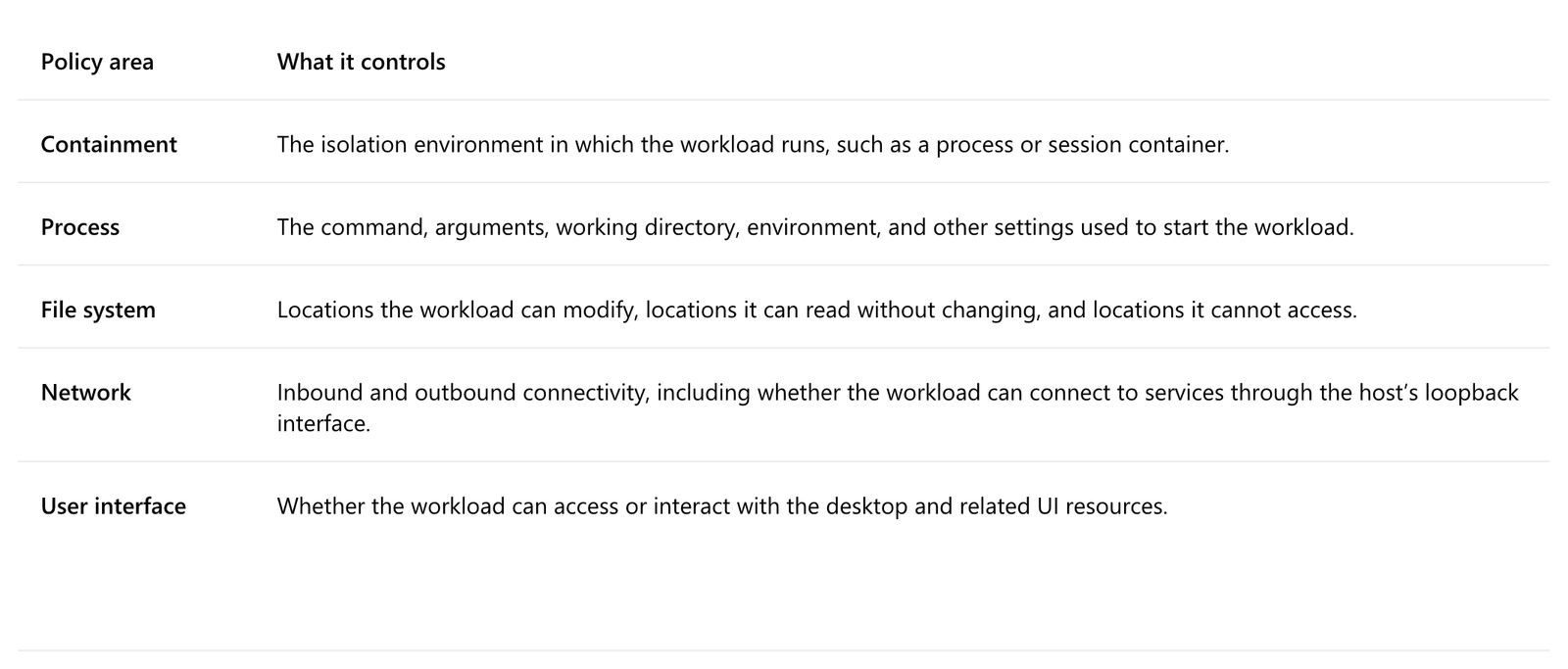
Device eligibility comes down to build numbers. Microsoft introduced MXC process isolation in Windows 11 24H2 build 26100.9278 and 25H2 build 26200.9278. According to reports, the feature first arrived in the optional August 27 update KB5120998. A matching build is not enough on its own. Because Microsoft is rolling the capability out to Windows 11 devices gradually, the documentation provides a command in Codex CLI 0.162.0 and later that tests MXC once without changing saved settings. If it returns MXC_OK and exit code 0, MXC is usable.
Some workflows change too. According to the documentation, under MXC any remaining child processes stop when the foreground command exits, which means workflows that leave a development server running in the background should be tested first. Managed networking requires allow_local_binding = true to be in effect, and MXC permits connections to and from services on the host loopback. According to reports, a bug report filed on the Codex GitHub issue tracker on October 4 said MXC fails before a command even starts if an unrelated drive is locked by BitLocker, and the issue was still open as of October 9.
MXC is the containment layer Microsoft built for agents. Developers or IT administrators declare the resources an agent may use, such as files and network destinations, and MXC enforces that policy at runtime with the appropriate container. "An agent cannot be its own security authority," Logan Iyer, corporate vice president for Windows Platform and Developer, wrote in the general availability post. Because the policy sits outside the agent, neither the agent nor the code it generates can grant itself more access. Weighing the two options of granting unrestricted access and hoping nothing goes wrong, or blocking agents and losing productivity, Iyer wrote: "Neither option is acceptable."
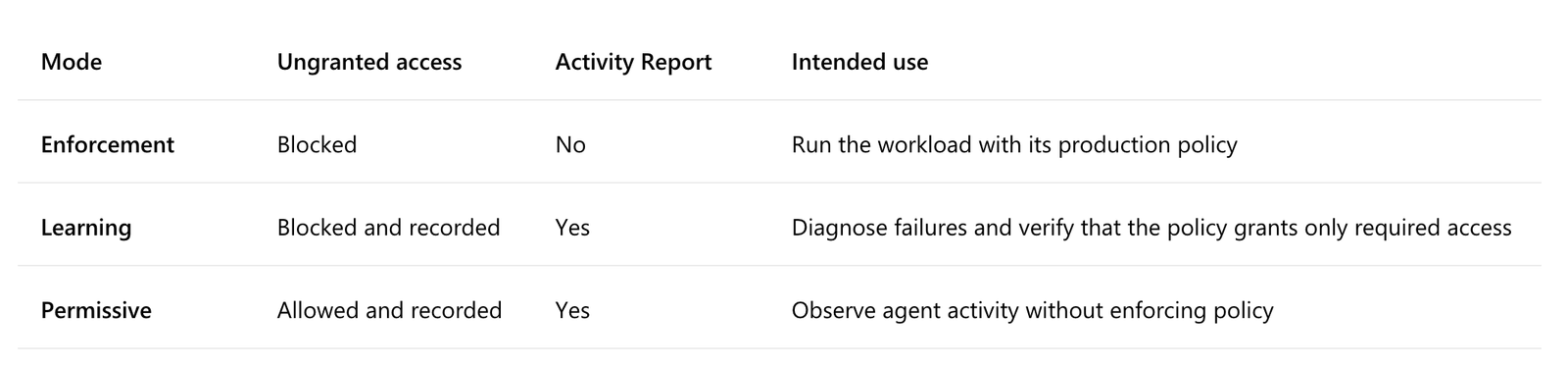
Isolation comes in four backends. The process container runs on Windows 11, macOS and Linux, using AppContainer on Windows, Seatbelt on macOS and Bubblewrap on Linux. The session container, which runs an agent under a separate Windows account and session, and the WSL container are Windows 11 only, while the MicroVM, which uses a hardware virtualization boundary, is experimental. Policies can run in an enforcement mode that only blocks, a learning mode that blocks and records, and a permissive mode that allows and records.
It is not just Codex. Microsoft said GitHub Copilot, OpenClaw, Replit, LM Studio and Unsloth AI already support MXC, and that Anthropic's Claude Code, Box, Perplexity, Manus and others are preparing support. NVIDIA has integrated OpenShell into MXC. Enterprise management tools are not all in place yet. Microsoft said it will soon release Intune policies to manage MXC process containers and an Entra capability that distinguishes agent activity from human activity. METAL has reported that OpenAI launched the Codex Composer predictions beta.
The change moves the safety boundary for coding agents away from the agent itself and into the operating system. On macOS and Linux, Codex already relied on native OS sandboxing, while Windows required detours through administrator approval, separate accounts and firewall rules. MXC narrows that gap. What remains for development teams is to define, in policy files, the boundaries they will allow agents before handing them work.



Comments